Showing posts with label VoIPSwitch. Show all posts

Wednesday, October 5, 2011

Basics of VOS 3000 : Part -1

In VOS3000, most data managements can be completed through sheets. Sheets can be opened by double-clicking corresponding nodes in (navigation). The following operations are supported:
  • Filter: Get current configuration from server.
  • Copy: Copy the currently selected sheet line into the clipboard.
  • Paste: Paste the line in the clipboard into a sheet with the same type.
  • Insert: Insert new lines.
  • Delete: Delete sheet lines. If the data are at the server, the selected lines will be marked as “to be deleted”.
  • Apply: Send currently specified operations (such as insertion, deletion and modification) to the server to carry out. (*** Before clicking “apply”, all the operations of data are saved only at the client end and will not affect the server-end data; closing the management page would discard these operations)
  • Export: Export the current sheet into local files.
  • Import: Import data from local files into the sheet (supported by a few types of sheets) Batch data operations can be fulfilled by “copy”, “paste”, and column “fill-down” functions supported by spreadsheets in VOS3000. See the illustration below:


Login:
After downloading the VOS3000 install the software in your computer.
 
Upon running VOS3000 client, the login dialogue box will be shown.
  • Server IP: IP address of the remote server.
  • User Name: User names allowed by the platform.
  • Password: User password allowed by the platform.

The system will record IP addresses typed by users for later use. Users can also delete this historical server IP. The initial User Name and Password are both admin.


After Login:
After successful logged in the opening screen will appear (Click the below picture to enlarge).

At the left side navigation menu you will see the following options:
  • Rate Management
  • Package Management
  • Account Management
  • Operation Management
  • Audio Management
  • Data Query
  • CDR Analysis
  • Cards Management
  • System Management
  • Number Management


At the top you will see the Menu Bar. The functions in the Menu Bar can also be found in the Navigation Menu. These Are:

System
Operation Management
Audio Management
Data Query
CDR Analysis
Cards Management
System Management
Number Management

On the Tools Bar you will also find the following options:
Open
Filter
Copy
Paste
Delete
Apply
Export
Import

Related Story:

Saturday, July 23, 2011

What is SIP - Session Initiation Protocol

To provide advanced telephony service over the Internet (VoIP) a Protocol named Session Initiation Protocol (SIP) has been developed by the IETF (Internet Engineering Task Force). Session Initiation Protocol or SIP is signaling protocol used to established sessions in an IP network like two-way call (IP-2-IP call, Net-2-Phone call etc), a collaborative multi-media conference system. SIP calls may be terminal to terminal, or they may require a server to intercede. If a server is to be involved, it is only required to locate the called party. For inter-working with non-IP networks, Megaco and H.323 are required. Often vendors of VoIP equipment integrate all three protocols on a single platform.

Various telecommunication services like Mobile dialer or PC Dialer service, Calling card services, Click and dial from Web page, Instant messaging, IP Centrex service and many other Voice-enriched E-Commerce services has become possible with the help of Session Initiation Protocol or SIP.

SIP has been designed upon some other protocol like HTTP (Hypertext Transfer protocol), SMTP (Simple Mail Transfer Protocol). SIP borrows most of its syntax and semantics from the familiar HTTP. In an IP-based network it is used to setup, change or end calls between two or more users.

In two method calls can be setup using SIP called, Redirect and Proxy and the server are designed to handle these modes. Both modes issue an “invite” message for another user to participate in a call. The redirect server is used to supply the address (URL) of an unknown called addressee. In this case the “invite” message is sent to the redirect server, which consults the location server for address information. Once this address information is sent to the calling user, a second “invite” message is issued, now with the correct address.

The following features of SIP are playing a major role in the field of VoIP (Voice over Internet Protocol):

Media negotiation: The inbuilt SIP mechanism that allow concession of the media used in a call, enable selection of the proper codec system to making a call between various devices. Thus, simple devices can make VoIP phone call, using the selected codec system.

Feature Negotiation: This feature allows the group involved in a call to agree on the features supported. This may be a multi-party call. All the parties can support the same level of features. For some codec video may or may not be supported; as any form of MIME type is supported by SIP. During making a call one user can bring other users onto the call or cancel the call or may placed or hold the call.

User location and name translation: It ensure that the participation of the second user in the call wherever he is located. Carrying out any mapping of expressive information to location information. Ensuring that details of the nature of the call (Session) are supported.

Changes of Call features: Using SIP a user can setup Voice-Only mode, but during making a call the caller need to enable a video function. A third party joining a call may require different features to be enabled in order to participate in the call.


Some special features of Session Initiation Protocol:
  • SIP messages are text based and hence are easy to read and debug. Programming new services is easier and more intuitive for designers.
  • SIP re-uses MIME type explanation in the similar way that email clients do, so applications related with sessions can be launched automatically.
  • SIP re-uses a number of existing and mature internet services and protocols such as RTP, DNS, RSVP etc. No new services have to be introduced to support the SIP infrastructure, as much of it is already in place or available off the shelf.
  • SIP extensions are defined clearly, enabling VoIP service providers to add them for new applications without damaging their own networks. Older SIP-based equipment in the network will not hamper newer SIP-based services. An older SIP implementation that does not support technique / title utilized by a newer SIP application would simply ignore it. SIP is transport layer independent. Therefore, the underlying transport could be IP over ATM.
  • SIP uses UDP - User Datagram Protocol, as well as the TCP - Transmission Control Protocol, lithely connecting users independent of the primary communications.
  • SIP supports multi-device feature leveling and negotiation. If a service or session initiates video and voice, voice can still be transmitted to non-video enabled devices, or other device features can be used such as one way video streaming.

SIP sessions use up to four major components:
  • SIP User Agents
  • SIP Registrar Servers
  • SIP Proxy Servers and
  • SIP Redirect Servers.

Together, these systems deliver messages embedded with the SDP protocol defining their content and characteristics to complete a SIP session.

Further reading about SIP.


Other topic:

Saturday, April 30, 2011

Overall Monitoring of gPlex Reseller

Some basics and common tips and techniques to monitor gPlex Level-3 / Master reseller or even level-2 or level-1 reseller:

Current Calls:
  • Click on the Current Calls at the bottom of the left side menu to see active or running calls in your reseller.
  • How many calls are currently being connected will be shown (see picture).
  • Click Show details to see more details of every call.


  • After Clicked on Show Details the following screen will appear.
  • Here you will see every active call of your reseller with detail. Record for every call (User, PIN number, Destination number, Call duration etc) will be shown.


Call Summery:
  • Click on Call Summery, total call duration for every destination will shown (see the picture below).
  • Last Day: See previous or last day's call summery.
  • This Week: Call summery of running week (previous 7 days).
  • Customized report: Enter start date and end date to see specific day / days report of Call Summery.


Search Log:
  • Below Home click on the Search Log to see details call log (see the below screen shot).
  • Suppose, you want to see one of previous day's or current days or more than one days details call record for any user's or any PIN number's.
  • Select the reseller from the top or type the PIN number in the provided field.Now enter the beginning date and end date and press Submit button. To see on day's record, type start and end date same. All records of the day / days will shown for the selected user, PIN number, destination, destination number etc.


Reseller Transaction History:
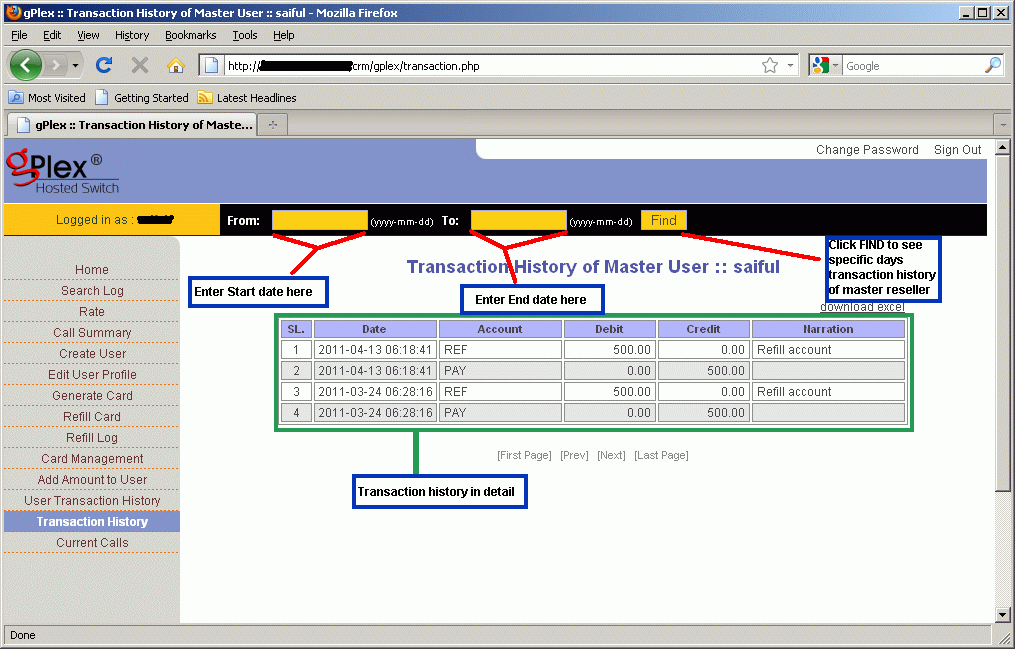
  • Click on the Transaction History. Enter start date and end date in the provided field and press Find. All transaction details of your own reseller will appear. This history can't be edited of changed. In the remarks you will see whatever your provider writes.
  • Date, time, amount, remarks / memo for every payment will be show.

The maintaining process is very easy in gPlex hosted switch. These are most common tips to regular monitoring your own Level-3 / Master reseller. Read other related posts (VoIP Tutorial) in the blog including VSR tutorial also.

Other related posts:
Rate Management in gPlex

Wednesday, November 3, 2010

Frequently Asked Questions about VoIPSwitch | Part 2


What else do I need apart from voipswitch?

Windows based hosted server is the basic requirement to run VoipSwitch software. The package from voipswitch.com does not offer any Hardware, Server or Operating system. So if you want to buy a SoftSwitch you need your own or rented server, all elements should arranged by yourself. The support team will only just install the software on your server and configure the whole system remotely.

Details about some recommended hardware and supported operating systems can be found on voipswitch website. Setup can be done at your own place or at a rented server from hosting companies. Many hosting company give better support and high quality internet connection. These companies give service in monthly rent.

With regards to the required internet Bandwidth (B/W) it depends on the number of concurrent calls (CC), used proxy methods and Codec. It takes usually one or two working days to complete the whole process. After completion of installation voipswitch.com just need the access permission and details to provide after sales service for one year.


PSTN gateway:
In most cases you don’t need any PSTN gateways to run your own hosted VoipSwitch Software as the whole range of scenario can be deployed without having your own equipment. The calls collected from VOIP clients (using Mobile Dialer, PC Dialer, Call back Dialer, Calling card and other calling methods) can be terminated directly through VoIP (Voice over Internet Protocol) carriers and sent to them over Internet. And it does need any physical connected link.

But the only exception is if you want to offer call termination through local PSTN Telecoms and for this the only way to connect is through E1 / T1 connectivity interface (or sometimes GSM or analogue lines). For this kind of implementations you will need a gateway which will provide the required interface. Its role will be limited and it will only convert PSTN to VOIP or VOIP to PSTN. VoipSwitch will control the rest of the process. 

The VoipSwitch Softswitch is compatible with all SIP and H323 compliant gateways like Quintum, Cisco and others. Similarly is in origination services like Calling Cards.

The system can work with DIDs, like Virtual phone numbers delivered through internet directly from provider to VoipSwitch. For example if you want to establish a local access number in USA than you need to first rent a local phone number in your desired geographical location (toll free or national number) and have required number of channels associated with the number. When your customers dial the number their calls will be forwarded through Internet to your VoipSwitch which in turn will carry out the programmed IVR scenario.

This IP (Internet Protocol) based approach in the IVR module allows for easy use of multiple access numbers in various geographical locations without high capital expenditures in equipment.

If still for some reasons you have to connect to local Telecom companies in order to setup an access number than the requirement is: you need a gateway with proper physical interface like E1/T1, Analogue, GSM etc.


The gateway does not have to support IVR systems, it should be configured in the way that all incoming calls through PSTN are converted to voip and then forwarded them to VoipSwitch. Then it is VoipSwitch which plays voice prompts, asks for PIN (or authorize by ANI) and carry out the whole procedure.

More about the IP IVR system can be found HERE.


Related Topis: 

VSR Tutorial:
Share/Bookmark