Showing posts with label Gplex Switch. Show all posts

Saturday, July 23, 2011

What is SIP - Session Initiation Protocol

To provide advanced telephony service over the Internet (VoIP) a Protocol named Session Initiation Protocol (SIP) has been developed by the IETF (Internet Engineering Task Force). Session Initiation Protocol or SIP is signaling protocol used to established sessions in an IP network like two-way call (IP-2-IP call, Net-2-Phone call etc), a collaborative multi-media conference system. SIP calls may be terminal to terminal, or they may require a server to intercede. If a server is to be involved, it is only required to locate the called party. For inter-working with non-IP networks, Megaco and H.323 are required. Often vendors of VoIP equipment integrate all three protocols on a single platform.

Various telecommunication services like Mobile dialer or PC Dialer service, Calling card services, Click and dial from Web page, Instant messaging, IP Centrex service and many other Voice-enriched E-Commerce services has become possible with the help of Session Initiation Protocol or SIP.

SIP has been designed upon some other protocol like HTTP (Hypertext Transfer protocol), SMTP (Simple Mail Transfer Protocol). SIP borrows most of its syntax and semantics from the familiar HTTP. In an IP-based network it is used to setup, change or end calls between two or more users.

In two method calls can be setup using SIP called, Redirect and Proxy and the server are designed to handle these modes. Both modes issue an “invite” message for another user to participate in a call. The redirect server is used to supply the address (URL) of an unknown called addressee. In this case the “invite” message is sent to the redirect server, which consults the location server for address information. Once this address information is sent to the calling user, a second “invite” message is issued, now with the correct address.

The following features of SIP are playing a major role in the field of VoIP (Voice over Internet Protocol):

Media negotiation: The inbuilt SIP mechanism that allow concession of the media used in a call, enable selection of the proper codec system to making a call between various devices. Thus, simple devices can make VoIP phone call, using the selected codec system.

Feature Negotiation: This feature allows the group involved in a call to agree on the features supported. This may be a multi-party call. All the parties can support the same level of features. For some codec video may or may not be supported; as any form of MIME type is supported by SIP. During making a call one user can bring other users onto the call or cancel the call or may placed or hold the call.

User location and name translation: It ensure that the participation of the second user in the call wherever he is located. Carrying out any mapping of expressive information to location information. Ensuring that details of the nature of the call (Session) are supported.

Changes of Call features: Using SIP a user can setup Voice-Only mode, but during making a call the caller need to enable a video function. A third party joining a call may require different features to be enabled in order to participate in the call.


Some special features of Session Initiation Protocol:
  • SIP messages are text based and hence are easy to read and debug. Programming new services is easier and more intuitive for designers.
  • SIP re-uses MIME type explanation in the similar way that email clients do, so applications related with sessions can be launched automatically.
  • SIP re-uses a number of existing and mature internet services and protocols such as RTP, DNS, RSVP etc. No new services have to be introduced to support the SIP infrastructure, as much of it is already in place or available off the shelf.
  • SIP extensions are defined clearly, enabling VoIP service providers to add them for new applications without damaging their own networks. Older SIP-based equipment in the network will not hamper newer SIP-based services. An older SIP implementation that does not support technique / title utilized by a newer SIP application would simply ignore it. SIP is transport layer independent. Therefore, the underlying transport could be IP over ATM.
  • SIP uses UDP - User Datagram Protocol, as well as the TCP - Transmission Control Protocol, lithely connecting users independent of the primary communications.
  • SIP supports multi-device feature leveling and negotiation. If a service or session initiates video and voice, voice can still be transmitted to non-video enabled devices, or other device features can be used such as one way video streaming.

SIP sessions use up to four major components:
  • SIP User Agents
  • SIP Registrar Servers
  • SIP Proxy Servers and
  • SIP Redirect Servers.

Together, these systems deliver messages embedded with the SDP protocol defining their content and characteristics to complete a SIP session.

Further reading about SIP.


Other topic:

Saturday, April 30, 2011

Overall Monitoring of gPlex Reseller

Some basics and common tips and techniques to monitor gPlex Level-3 / Master reseller or even level-2 or level-1 reseller:

Current Calls:
  • Click on the Current Calls at the bottom of the left side menu to see active or running calls in your reseller.
  • How many calls are currently being connected will be shown (see picture).
  • Click Show details to see more details of every call.


  • After Clicked on Show Details the following screen will appear.
  • Here you will see every active call of your reseller with detail. Record for every call (User, PIN number, Destination number, Call duration etc) will be shown.


Call Summery:
  • Click on Call Summery, total call duration for every destination will shown (see the picture below).
  • Last Day: See previous or last day's call summery.
  • This Week: Call summery of running week (previous 7 days).
  • Customized report: Enter start date and end date to see specific day / days report of Call Summery.


Search Log:
  • Below Home click on the Search Log to see details call log (see the below screen shot).
  • Suppose, you want to see one of previous day's or current days or more than one days details call record for any user's or any PIN number's.
  • Select the reseller from the top or type the PIN number in the provided field.Now enter the beginning date and end date and press Submit button. To see on day's record, type start and end date same. All records of the day / days will shown for the selected user, PIN number, destination, destination number etc.


Reseller Transaction History:
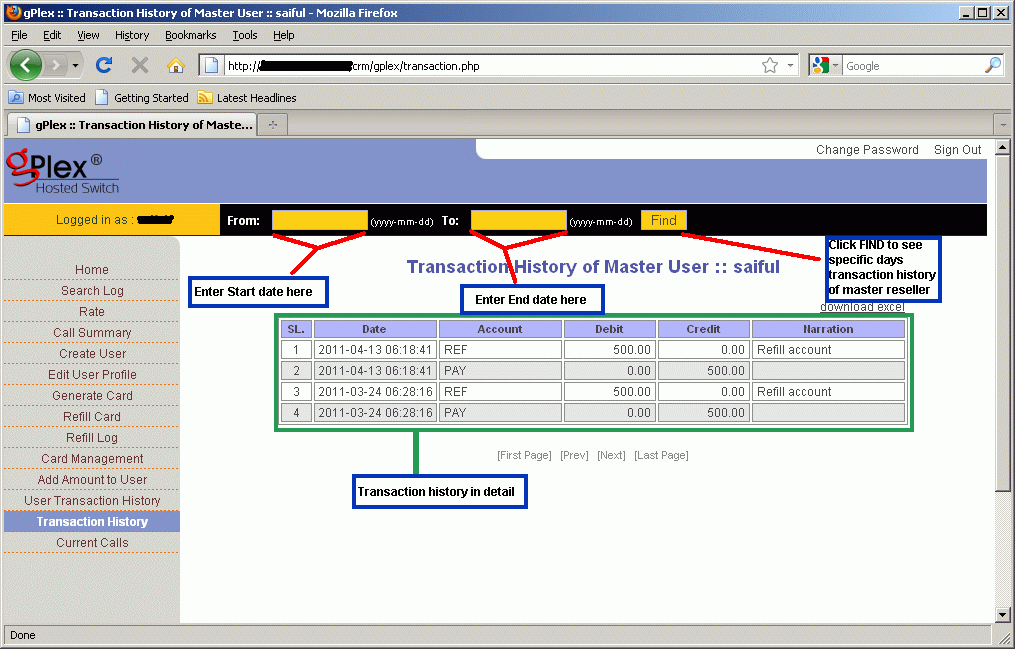
  • Click on the Transaction History. Enter start date and end date in the provided field and press Find. All transaction details of your own reseller will appear. This history can't be edited of changed. In the remarks you will see whatever your provider writes.
  • Date, time, amount, remarks / memo for every payment will be show.

The maintaining process is very easy in gPlex hosted switch. These are most common tips to regular monitoring your own Level-3 / Master reseller. Read other related posts (VoIP Tutorial) in the blog including VSR tutorial also.

Other related posts:
Rate Management in gPlex

Monday, April 25, 2011

Rate management in gPlex

Another important in gPlex reseller account is the Rate Management. Managing rate plan in gPlex is little bit different than typical VSR System (VoIP Switch Reseller System). In gPlex user can't create any rate plan / tariff of his own like VSR. But if Admin add more than one rate plan to resellers account than Master User / Level-3 reseller holder can set more than one rate plan for the same user account by adding ditional prefix.

After reading this post this process will be much easier for any new Level-3 / Master reseller user.

Rate Plan:
  • Click on Rate at the left side navigation menu. The following screen will be shown.
  • At the top you can see how many Rate Plan has been added to your reseller. Select any rate plan.
  • In the list you will see Name, Code, Carrier Rate, Card Rate and Route column.
  • Carrier rate means your current carrier buying rate per minute from your provider. This rate can't be edited from Level-3. And Card rate means your selling rate to your user. This rate can be changed from Master Reseller.
  • Click on Edit to change the Card Rate. And Click on Show to see the route or added destination prefix.
  • You can filter your search to find out desired destination. Enter some of the first letters of the destination in the name field (see top-right side) and press the FILTER button.


Changing Card Rate:
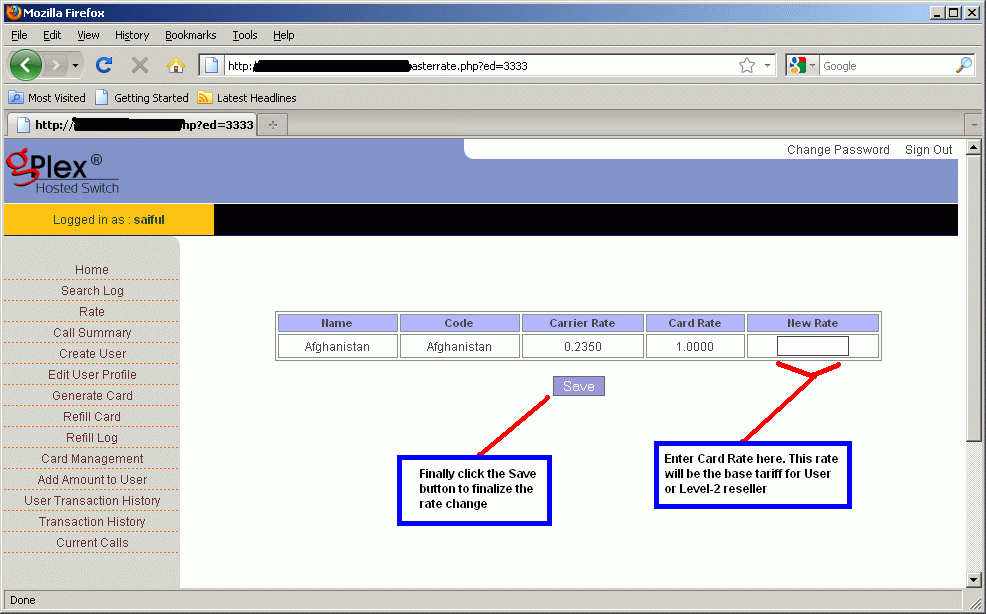
  • After clicking on the Edit link for any destination, the following screen will appear (click to enlarge).
  • In the field New Rate enter new rate for the destination which will be Level-2 / User's base tariff.
  • Finally click on the Save button, changed rate would be saved.


Show Dialing Plan:
  • After clicking on the Show link for any destination you will see a new window like the following picture.
  • Dial Digit means dialing plan (code) for the destination.


Add new rate plan:
  • Click on the Edit User Profile from the left side menu you will see all details of the clicked user. At the bottom of the page beside Rate Plan there's a button "ADD". Click on this to add additional rate plan.
  • Remember the user's default rate plan. Now select other rate plan (See the picture below) except the default.
  • In the Dial in Prefix field enter some prefix. For example, if the default rate plan for Bangladesh is 88 for Rate plan A. Than to add rate plan B as additional plan enter 00 on the Dial in Prefix field and client will dialer 88..... and 0088...... (this way). When they dial with 88 the call will go through Rate plan A and for 0088 the call will go through Rate plan B.
  • After adding new rate plan click on the Add button at the bottom of the page.


For other further details fill free to contact us or if you have any comments just type your comments below, it will be highly appreciated.
Diroo

Other related posts:

Tuesday, April 12, 2011

gPlex Switch Reseller Card Management

Generating, Management, Editing... of card / PIN in gPlex switch's is little bit different than VSR System (VoIP Switch Reseller System). In VSR System PIN number can be generated only in Level-1 but in gPlex Switch Reseller, PIN can generated in Level-1, Level-2 and eve in Level-3 or Master reseller.
The process in gPlex is not so hard, According to my opinion its little bit easy then VSR System. But there's some limitations. In VSR System PIN (both user name and password) can be edited but gPlex PIN can't be edited after generating.

Lets take a look at the whole process. You can see at the right side navigation menu of this blog (VoIP Tutorial section) to see more details about VSR System.

Generate Card in Level-3 reseller:
From your Level-3 / Master reseller Homepage go to the Generate Card section at the left side. The following page will appear (Click to enlarge).
  • Select your User (Level 2) for whom you want to generate card.
  • In the Value of Card field enter the amount of card. Suppose 5 $, 10 $, 50 $ or 100$ etc..
  • Enter the Total number of cards you want to generate.
  • Enter your secret in the Secret field. You will get your reseller account's secret from your provider. Always use the secret of your logged in reseller. If you are generating cards from Level-3 than enter only your level-3 secret.
  • Click the Generate button. Within seconds your desired PINs would be generated. You will see your generated PINs. Remember one thing, your PIN could have only PIN number or even PIN number + Password. If there's only PIN number than use the PIN number as password also. Ask your provider for more details.


Card Management:
Click on the Card Management section of your reseller, you the a page like the following screen shot.
You will see several lot of PINs date wise. The date is when the PINs were generated. User is during generation which reseller you selected. Than you will see No of cards, Total remaining value of cards, Used amount etc.
Click on the date or reseller name to see more details about that Lot.


After clicking on the Date or User name you will see the following screen. Every PIN of that Lot, their Serial number, Balance, Card number, Password, Used amount, remaining amount, Active / Inactive status etc.


How to Recharge or Refill card:
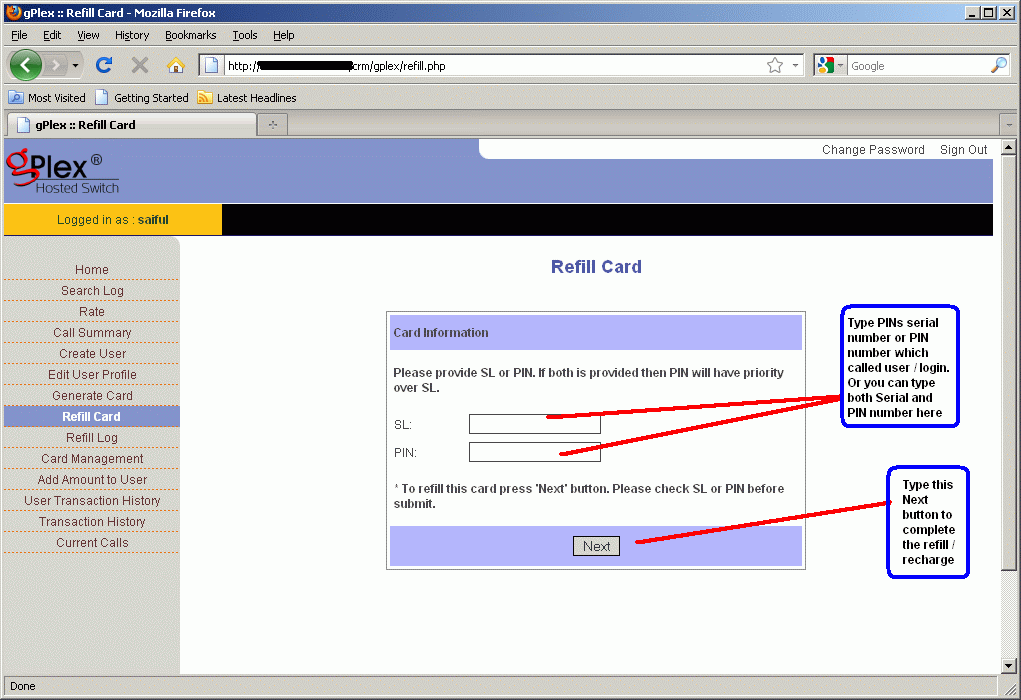
Click on the Refill card section to recharge a PIN or card. The following screen will shown.
Enter the Serial number in the SL field or enter the PIN number in the PIN field. Or even you can enter both of them.
Now press the Next button.


After pressing the Next button you will see the following screen. Here you will see all details about the PIN / Card you want to refill.
Enter the amount you want to recharge in the Refill Amount field.
Enter some narration / notes / memo en the Narration field.
Press the Refill button to finalize the refill. You will a confirmation message on the screen.


Card Refill History:
Click on the Refill Log section at the left side. Enter your PIN number for which you want to see refill history. Enter Start date and End date. and press the search button. You will see details record of the card recharge in row and column.


You can apply the above process for gPlex Level-2 and Level-1 reseller account. I think the process is little bit easier than VSR System. What do you think ? You can submit your comments below. And if you have any kind of questions regarding this matter. feel free to mail me.


Other posts related to that topic
:

Tuesday, April 5, 2011

Level-1 and Level-2 Reseller in gPlex

How to maintain Level-2 reseller and Level-1 reseller in gPlex Switch reseller system, I am going to discuss briefly for new gPlex Switch reseller users and sub-users in this post. Some basics about how to monitoring Reseller account will be discuss also.


gPlex Reseller Level-2 / User:
  • Type your level-2 login address (for gPlex every level has different login address) in the address bar of your browser and press ENTER.
  • The following page will appear (follow the screen shot).
  • Enter your User name in the User field.
  • Enter your Password in the Password field and press the Submit button.
  • You will enter your Level-2 reseller Homepage.


User / Level 2 reseller Homepage:
Take a look at the following screen shot (Click on this picture to enlarge). At homepage you will see Today's Report and Account Status. In Today's report you will see your total Sub users (level-1) total calls duration, revenue, reseller costs, ASR (Average Success Rate), ACD (Average Call Duration). You can see previous day's report or before that day's report or even report of last week or as you like. In the Account Status your will see your own account balance, Used balance, remaining balance etc.
Take a look at the left side navigation menu.
  • Rate: Click to see the your reseller rate plan.
  • Card Management: Click to see your generated cards, add balance to card, lock or unlock card.
  • Create Sub user: Level-1 reseller or Sub-user can be created from here.
  • Sub User List: List of all created Sub-user or Level-1 reseller account.
  • Refill to Sub User: Add amount or balance to sub user.
  • Sub User Transaction: To see details payment history of Level-1 user.
  • Generate Card: New Card generation
  • Refill Card: Refill or recharge specific card / PIN.
  • Refill Log: Card refill / recharge history.
  • Transaction History: Your Reseller Level-2 transaction / Payment history.
  • Current Calls: Click to see current active calls with details.


gPlex Reseller Level-1 / Sub User:
  • Type your level-1 Login address (for gPlex every level has different login address) in the address bar of your browser and press ENTER.
  • The following page will appear (follow the screen shot).
  • Enter your Sub-user Name in the User field.
  • Enter your Password in the Password field and press the Submit button.
  • Your Level-1 reseller Homepage will appear.


Sub User / Level 1 reseller Homepage: 
Take a look at the following screen shot (Click on this picture to enlarge). After logged in your homepage you will see Today's Report and Account Status. In Today's report you will see no of total calls, total minute, bill, ASR (Average Success Rate), ACD (Average Call Duration). You can see previous day's report or before that day's report or even report of last week or as you like. In the Account Status your will see your own account balance, Used balance, remaining balance and Status (Active / Inactive).
Take a look at the left side navigation menu.
  • Report: Click to see see report of daily usage.
  • Rate: Click to see the your reseller rate plan.
  • Generate Card: New Card / PIN generation
  • Card Management: Click to see your generated cards, add balance to card, lock or unlock card.
  • Refill Card: Refill or recharge specific card / PIN.
  • Refill Log: Card refill / recharge history.
  • Transaction history: Your Reseller Level-1 transaction / Payment history.


Other related post:

Wednesday, March 30, 2011

gPlex Hosted SoftSwitch Master Reseller Basics

One of the scalable and comprehensive SoftSwitch in the market to handle VoIP (Voice over Internet Protocol) call termination is gPlex Hosted SoftSwitch.

In this post I am going to discuss some common and important basics about Master / Level-3 Reseller of gPlex Switch Reseller System.

gPlex Login:
Click the following screen shot to enlarge. Type your reseller link or IP in the browser address bar and press enter. Type your Master Reseller accounts correct User name, Password and press Submit button or enter.


Changing Password:
  • After logged in using your user name & password click on the Change Password link at the top-right corner of your reseller homepage.
  • Change your password providing your old and a new password.
  • Click on the picture below to see how.


Master Reseller Homepage:
After logged in to your reseller account you will see a page like the following screen shot.
Total number of your active user's (Level-2), their call history, revenue, reseller cost, ASR (Average Success Rate), ACD (Average Call Duration) etc will shown on Homepage.

  • Last Day: You can see last day reports clicking on the Last Day link, Previous one week report, Specific day or others.
On the left side navigation menu:
  • Search Log: Click on Search Log to see detail calls history of your users.
  • Rate: Below Search Log click on the Rate to see your Base Tariff (carrier rate). You can edit your Card Rate here. The rate plan section in gPlex is different than VSR System.
  • Call Summery: Click here to see daily call summery to various destinations. You can see previous days history too.
  • Create user: To add new User (Level-2 reseller account) click here.
  • Edit User Profile: To edit existing user, Making it active / inactive, Changing Password / Secret or changing some other options about reseller click here.
  • Generate Card: Click on this link to generate new PIN / Card number.
  • Refill Card: To refill or add balance to any generated Card / PIN number.
  • Refill Log: Refill / Payment history of your Cards / PINs. Click on this link and select the "from" and "to" date and press Show.
  • Card Management: Click on this link to see all your resellers (user / level 2) Card number.
  • Add Amount to user: Click to add amount or balance to your user.
  • User Transaction history: Level-2 reseller account payment history, you can see date wise.
  • Transaction History: This link will tell you your total payment record that your provider gave you.
  • Current Calls: This is link that you can see your current reseller calls.


Related posts:

Tuesday, November 2, 2010

Frequently Asked Questions about VoIPSwitch | Part 1


What is VoipSwitch?


VoipSwitch is a complete software platform that can be used to serve various purposes and can be used in various VoIP related applications, like:
  • Internet Telephony Service Providers as the base system for offering VoIP services to end-users.
  • Wholesale voip termination brokers as the traffic controller.
  • It can also be used as an IP PBX system.
  • Enterprises that wants to connect their remote branches,

It has simplicity, friendly interface and modularity, which allows minimizing the initial investment, VoipSwitch (VSR) is also a brilliant choice for start-ups in this challenging and rapidly growing VoIP market. VoipSwitch system (VSR System) consists of the main package and additional modules extending its functionality.


The main package includes the SIP/h323 SoftSwitch, built-in billing system based on SQL, web interfaces both for administrator and for end-users, SIP softphone with embedded VoIP tunnel client and some other useful tools. The additional modules are optional and can be added to the system at any moment without interrupting current activity.


Services can be offered using VoIPSwitch:
VSR provide basically all kind of services that are available in the VoIP market. The services can be divided on retail and wholesale:


Retail VoIP:

Device to phone i.e. making and receiving calls from SIP or h323 terminals (bidirectional NAT support), full compatibility with all popular brands of SOHO gateways and IP phones, voicemail, support for 5 class services, actual balance information on phone's display, waiting message indicator feature and more.


PC to phone and PC to PC: using our own sip based softphone with embedded voip tunnel client which allows for communication (both receiving and making calls) from behind voip blockades/firewalls, for example from UAE, or other countries where voip ports are closed.

Class 5 services: call forwarding, call waiting, follow me - possibility to set forwarding rules conditioned on various events like no answer, busy, not logged with different forwarding phone numbers / destinations (possibility to set multiple numbers with different priorities), hold, hold with conversation.

DIDs/Virtual phone numbers services: assigning phone numbers from various geographical regions to SIP or h323 devices or softphones. Customers can pick up a phone number directly from the web interface with immediate delivery. The system can work with leading DIDs provider thru their API or/and using own DIDs numbers stored in the local database.

Callback services: triggered by SMS, Web or a missed call. Works with DIDs as an access numbers. Authentication by callerID (ANI) or PIN. Also supported DID callback with unique DID associated with each customer and his/her phone number. Manageable thru the web interface, possibility to add multiple ANIs per user. Multilingual Interactive Voice Response System (IVR). More on the callback and its variants here

Voicemail: checking voice messages by calling predefined voicemail number from Softphone or SIP / H323 device or from PSTN through the IVR system (calling cards) or using the callback service. Detailed information about left messages on the web interface. Possibility to record own welcome prompt. Email notification about new voice messages.

Call Shops: by callshop is understood a place like internet café or a shop where are cabins/booths with IP phones from which customers can make calls and then pay for them at a cash desk. The callshop is a windows based application which shows all the cabins and the calls that are taking place. When a customer has finished, the cashier can see the made calls with their details and costs and can charge the customer. The application also allows printing bills. The advantage of this solution is that the callshop application does not require any special hardware as the calls are not sent thru it, instead they go directly to VoipSwitch (thru the internet connection) and the callshop program exchanges with VoipSwitch only little data needed for billing purposes. Also as the clients can be used softphones installed on PCs or FXS gateways with analogue phones connected, not necessarily IP phones.

Calling cards: phone to phone services in which a customer dials an access number first and he / she is asked about PIN (or authenticated by callerID/ANI) and then prompted for a destination phone number. The system comes with own IP based IVR system that supports several languages (possibility to add new), balance announcement, max duration for the call announcement, also it allows to recharge account by PIN and register actual ANI during the call and more. There are several scenarios which can be associated with particular access numbers. Moreover new scenarios can be added or the existing ones be modified by voipswitch's administrator as they are programmed in xml format. More on the IP IVR can be found here.


Wholesale services:
Wholesale Call Termination - bulk voice traffic termination, in this scenario VoipSwitch acts as the traffic controller which on one side collects calls from clients gateways or other equipment, authenticate them, and then depending on the routing tables send the traffic further to termination gateways/gatekeepers. The whole traffic is billed and controlled in real time, the billing supports both prepaid and post-paid accounts types. Also the media (voice) flow can be set per destination and be sent in full proxy mode where all packets are going through the switch or in the modes where only signalization is sent through the system while the media goes directly between endpoints.

The system allows to hide the source and the destination what is often important especially if you work as a broker buying and selling traffic from various parties. Additionally the system offers high flexibility in modifying calls setup, called numbers, enables you to manipulate prefixes, caller IDs and all other significant data before sending calls to the destination. There is also a web interface both for clients and terminators with CDRs (which can be exported to file) and other reports. More on the SoftSwitch's functionality here.


Read Other Related Articles:

Wednesday, August 18, 2010

VOS - Carrier-class VoIP Operation Support System

VoIP Operation Support System – VOS 3000/2000 is a system designed for carrier class operations. It provides the following solutions:
  • Exchange Rate Management
  • Card Management
  • Package Management
  • Account Management
  • Gateway Management
  • Phone Management
  • Softswitch Management
  • Number Management
  • Data Query and Web self-service system
  • System Management
  • IVR and User Management

This system also includes an add-on modules like the Global Card Business System (support 10 million cards) and extreme media proxy. VOS3000 Softswitch supports H323 / SIP / SIP-H323, with a capacity of up to 10,000 concurrent calls. 


System Performance:
  • Stand-alone performance
  • For Single Server total number of calls >= 10,000 (signaling forward)
  • Medial forwarding capacity of Server >= 2,000 (B/W limit 100 Mbps)
  • Call per second >= 1200 CPS (4,320,000 BHCA)
  • Supported protocol: HTTP, SIP, H323, TCP / UDP, etc


Important features of VOS 3000 System:
  • For VoIP (Voice over Internet Protocol) operators
  • Real-time control of soft-switching platform
  • Routing by (ASR) and Least Cost Routing (LCR)
  • Full support for Voice calls, Fax and Video call support.
  • Gateway group, preset profit rate
  • Overload protection, load balancing and redundancy backup mechanism.
  • Voice codec priority settings and Softswitch platform Control.
  • Dual Hot-backup mechanism
  • Multi-server distributed placement and centralized management
  • Connect analysis, interruption analysis and Excellent Compatibility
  • Multi-gateway encryption standard
  • Real time monitoring of Call performance
  • Area code automatically added by phone.
  • Global Card management business, IVR service helps to achieve one million global cards.
  • Various Package features, providing daily/weekly/monthly basis or annual rent and other available methods
  • Efficient media access transponder modules, forwarding up to 2000 concurrent calls.
  • Value added business expansion
  • A better after sales and technical support service
  • After rigorous testing, VOS system provides stable and reliable high-performance carrier-class services.
Increasing value-added service modules bring more rich business modes to the customers.
After thorough testing, the VOS3000 VoIP softswitch proves to be a constant and dependable high-performance carrier-class system.

For more details visit: vos3000


related posts:


Friday, August 6, 2010

gPlex Hosted SoftSwitch | for Small or Medium VoIP Business


gPlex SoftSwitch is a comprehensive and scalable SIP SoftSwitch which enables establishment of secure and reliable Voice over Internet Protocol (VoIP) networks. gPlex offers flexible routing, centralized authentication and reliable billing. It is comprised of RTP Proxy, SIP Signaling, CDR, NAT Traversal, Billing, IVR, Voice Logging, and High Availability (HA).

A standard gPlex hosted SoftSwitch system can handle up to 2,000 simultaneous calls and it is easily scalable to 40,000 simultaneous calls with carrier edition. The High Availability (HA) feature provides robust redundancy to ensure that calls never get interrupted in the event of power failure or hardware. Using gPlex SoftSwitch, service providers can benefit from improved call completion rates, less revenue leakage, and improved network security and availability.


Features of gPlex Hosted SoftSwitch:

  • SIP & H.323 protocol
  • User-friendly web interface
  • Web panel for Master user, User & Sub-user
  • 99.9% uptime
  • Redundant IP network in hot-standby mode
  • Redundant power supply with duel power drop
  • Intelligent routing
  • SIP / H.323 protocol conversion
  • 24x7 support and free upgrades of new releases
  • Free training program for engineers, assistance with initial system configuration


High Availability (HA)

gPlex - HA module, offers virtually 100% uptime which ensure high network availability. It can be configured with gPlex - HA module on a backup server which provides true reflect of master gPlex SoftSwitch. HA server will take over all running calls within fraction of a second in the event of hardware or power failure. Thus user of gPlex-HA will never misplace billing.


High Scalability
gPlex SoftSwitch is offered in standard and carrier editions to meet the capacity needs of rising and established telecoms and service providers respectively. The standard edition of gPlex SoftSwitch supports up to 2,000 concurrent calls and carrier edition can handle up to 40,000 concurrent calls in full RTP proxy mode.

Multiple Routing
gPlex SoftSwitch has central and local routing capability. Central routing offers Least Cost Routing (LCR), ASR Routing, Priority Routing, Preferred Routing, and Route Fail-Over features. gPlex enables providers to select the most money-making and best quality routes for individual calls and helps increase call completion rates that translates into high revenues and earnings.

Enhanced RTP Proxy
gPlex SoftSwitch performs RTP Proxy for all calls and monitor each RTP packet to detect one way calls, hung or dead  calls. On detection gPlex terminates those types of calls immediately and sends messages to billing server to ensure accurate billing. 

Topology Hiding
gPlex SoftSwitch can securely separate their VoIP networks from the outside IP world. It can act as a traffic proxy between Termination network and Origination network, and it prevent outsiders from seeing the true topology of the protected network.

Auto Route Switching
gPlex SoftSwtich offers route switching capabilities to ensure higher call completion rates and reduced revenue loss. It monitors all endpoints in real-time and automatically pulls off routes in the event of quality parameters like ASR, ACD, and PDD falling below acceptable values preset by system administrators.

For medium and small size VoIP telephony service providers and resellers who want to enjoy carrier grade VoIP SoftSwitch with limited budget. gPlex Hosted SoftSwitch started from 100 channel to 1000 channel for them. This is very user-friendly web-interface for flexible routing, reliable billing, and real-time monitoring. User can handle everything using cell phone data network.

gPlex Hosted SoftSwitch offer various Packages. For more details visit the following sites:


Related posts:


Share/Bookmark