Showing posts with label Learning VoIP. Show all posts

Sunday, September 25, 2011

Callshop Solution

The rapid development of Voice-over-IP technology in the early 2000s has lead to fast innovation in the telecom sector. New telecom providers have introduced many innovative services utilizing VoIP technology, such as calling cards, call shops, broadband VoIP and others. Because such services are delivered over broadband lines, countries with well established last mile Internet infrastructure tend to adopt faster VoIP services where end-users install VoIP equipment at their premises (e.g. IP Phones), such as broadband VoIP. 

Alternatively, countries with limited or expensive last mile Internet infrastructure tend to adopt VoIP services that do not require end-users to install equipment, such as calling cards and call shops.

The Callshop business model appeals to providers in countries with limited bandwidth or expensive access to the Internet. Call shop services also offer lucrative opportunity in countries with limited number of telecom providers and heavy telecom regulation.

Consumers, in such countries, typically do not have access to low cost long distance and international telephony services. Finally, Callshops tend to flourish in areas which attract international tourism. In any of the above cases, Call shop operators can capitalize on VoIP technology and offer competitively priced calling services to any part of the world.


Business Solution
PROVIDER will offer end-to-end, cost-effective and scalable Callshop solution. The solution will feature powerful billing, flexible routing, and proven interoperability with VoIP equipment from other leading voip provider. Because PROVIDER will develop all solution components, callshop owners benefit from reduced integration costs and improved return on investment.


How will the solution work?

User experience
  • When a customer visit the Callshop. Customer will chooses a vacant telephony booth, will enters and place a call by dialing a destination number.
  • The call will get connected.
  • Upon call completion, the callshop operator will present the customer with an invoice for accumulated call charges.
  • Then the customer will pay the callshop operator.


Provider experience
  • When the user picks up the phone and dials a destination number, VoIP Gateway will send an authorization request to PROVIDER VoIP Billing Server.
  • Billing Server will verify whether a call can be placed from that particular booth and will authorize the call.
  • Then VOIP Gateway will pass the destination number to PROVIDER Softswitch and will requests routing information.
  • PROVIDER Softswitch will return VOIP Gateway the IP address of the remote (termination) gateway and VOIP Gateway will connect to it. Then the remote gateway will terminate the call to the destination party.
  • Upon call completion, PROVIDER VOIP Billing Server will records complete CDR information for the call and will make it available to the operator for billing, reporting and monitoring purposes.


Solution components are required
 
Core elements of SysMaster's Callshop Solution include:
  • PROVIDER VOIP Billing Server that supports a wide spectrum of prepaid post-paid VoIP services.
  • VOIP Gateway will be a carrier grade gateway that provides universal IP-PSTN switching, high flexibility and remote feature upgrade ability.
  • PROVIDER Softswitch is a flexible VoIP Softswitch that offers routing and reliable peering between VoIP networks and capable for high volume callshop implementations.

Other Posts:

Wednesday, September 14, 2011

Calling Card Business - Using VoIP Technology

Traditionally, the telecom sector has been one of the most lucrative market segments in both emerging and developed economies. But also traditionally, that sector has been protected by heavy local regulation. Nowadays, however, many countries have either started or are considering deregulation of their telecom sectors. Such strong trend towards liberalization of the sector, coupled with the emergence of new technologies for cost effective transport of voice data, and namely Voice-over-IP, opens up new revenue generating opportunities for entrepreneurs all over the world.


The calling cards business model offers a relatively low cost entry into the lucrative telecom market segment. The essence of the calling cards business model is to creatively segment customers by various demographic and/or behavioral characteristics and to design calling cards offerings to meet their specific calling needs. The calling cards business typically attracts entrepreneurs who want to enter the VoIP market, businesses with established retail distribution channels, and service providers who want to diversify their revenue streams.

 
Business Solution
Aiming PROVIDER as a leading VoIP service provider, PROVIDER has to offer integrated, scalable, and cost-effective calling cards solutions. Such solutions will feature powerful billing capabilities, intuitive CRM (Customer Relation Management) web portals, and proven interoperability with equipment from other VoIP providers. Because all solution components are developed by the engineers of PROVIDER and Softswitch Billing company, that reduces the need for integration costs at the PROVIDER VOIP service level which saves money for PROVIDER and improves our return on investment.


How will the solution work?
User experience
  • The user will purchase a calling card from a retail or online store.
  • The user will dial the local or toll-free access number printed on the card.
  • The user will hear a voice prompt, asking him to enter his PIN number.
  • The user will then enter the PIN number printed on the calling card using the phone dial pad.
  • He will hear his account balance and is invited to make a call.
  • The user will dial the number and will get connected.

 
Provider experience
  • When the user calls, PROVIDER Gateway, which is connected to the access number, will answer the call and send IVR prompts to the caller, inviting him to enter his PIN number.
  • PROVIDER Gateway will read the PIN and will send an authorization request to PROVIDER VoIP Billing
  • PROVIDER VoIP Billing will verify account information and will authorize the call if the user has sufficient balance.
  • Then PROVIDER Gateway will announce to the caller his account balance and will invite him to dial a destination number.
  • Then PROVIDER Gateway will pass the destination number to PROVIDER Softswitch and will request routing information.
  • PROVIDER Softswitch will return to PROVIDER Getaway the IP address of the remote gateway and Getaway will connect the call.
  • During the conversation, Getaway will convert voice signal to data packets and will route them to the terminating gateway (owned by the call termination provider) and vice versa.
  • Upon call completion, PROVIDER VoIP Billing will record complete CDR information for the call and then debit the user account with accumulated service charges.


Solution components are required
 
Core elements of PROVIDER's Calling Cards Solution include:
  • PROVIDER VoIP Billing, will be a robust billing server that provides us with all necessary tools to successfully implement a wide spectrum of VoIP business models.
  • VoIP Gateway, will be a flexible switching device that provides us with universal IP-PSTN switching, high flexibility and remote feature upgrade ability.
  • PROVIDER Softswitch will be an advanced VoIP softswitch that provides secure and reliable peering between our own networks and the VoIP networks of our business partners.

Related Topic:

Thursday, August 11, 2011

What is H.323 Signaling Protocol - A basic


To provide some special services through the internet (IP based network) such as real-time audio / video communication, data communication H.323 is a standard signaling protocol which components, protocols and procedures. H.323 is part of a family of ITU-T recommendations called H.32x that provides multimedia communication services over a variety of networks.

H.323 was invented to provide various multimedia applications through LAN (Local Area Network). But due to its popularity and rapidly growing services it has evolved in needs of VoIP (Voice over Internet Protocol). One important strength of H.323 was the relatively early availability of a set of standards. It was not only used to define basic call models but in addition to supplementary services that can easily involved in Business Communications. The first VoIP standard protocol is H.323 to adopt IETF standard RTP to transport audio and video communications over the internet (IP network). H.323 standard specifies four kinds of components, when networked together, provide the "point-to-point" and "point-to-multipoint" multimedia-communication services. These are:
  • Terminals
  • Gateway
  • Gatekeepers
  • Multipoint Control Unit

Terminals: Used for real-time bi-directional multimedia communications, an H.323 terminal can either be a personal computer (PC) or a stand-alone device, running an H.323 and the multimedia applications. It supports audio communications and can optionally support video or data communications. Because the basic service provided by an H.323 terminal is audio communications, an H.323 terminal plays a key role in IP–telephony services. The primary goal of H.323 is to inter-work with other multimedia terminals. H.323 terminals are compatible with H.324 terminals on SCN and wireless networks, H.310 terminals on B– ISDN, H.320 terminals on ISDN, H.321 terminals on B–ISDN, and H.322 terminals on guaranteed QoS LANs. H.323 terminals may be used in multipoint conferences.

Gateways: A gateway connects two dissimilar networks. An H.323 gateway provides connectivity between an H.323 network and a non – H.323 network. For example, a gateway can connect and provide communication between an H.323 terminal and SCN networks ( SCN networks include all switched telephony networks, e.g., public switched telephone network [PSTN] ). This connectivity of dissimilar networks is achieved by translating protocols for call setup and release, converting media formats between different networks, and transferring information between the networks connected by the gateway. A gateway is not required, however, for communication between two terminals on an H.323 network.

Gatekeepers: A gatekeeper can be considered the brain of the H.323 network. It is the focal point for all calls within the H.323 network. Although they are not required, gatekeepers provide important services such as addressing, authorization and authentication of terminals and gateways; bandwidth management; accounting; billing; and charging. Gatekeepers may also provide call-routing services.

Multipoint Control Units: MCUs provide support for conferences of three or more H.323 terminals. All terminals participating in the conference establish a connection with the MCU. The MCU manages conference resources, negotiates between terminals for the purpose of determining the audio or video coder/decoder (CODEC) to use, and may handle the media stream. The gatekeepers, gateways, and MCUs are logically separate components of the H.323 standard but can be implemented as a single physical device.


Key Benefits of H.323:

Codec Standards: 
H.323 establishes standards for compression and decompression of audio and video data streams, ensuring that equipment from different vendors will have some area of common support.

Interoperability:
Users want to conference without worrying about compatibility at the receiving point. Besides ensuring that the receiver can decompress the information, H.323 establishes methods for receiving clients to communicate capabilities to the sender. The standard also establishes common call setup and control protocols.

Network Independence:
H.323 is designed to run on top of common network architectures. As network technology evolves, and as bandwidth management techniques improve, H.323-based solutions will be able to take advantage of those enhanced capabilities.

Platform and Application Independence:
H.323 is not tied to any hardware or operating system. H.323-compliant platforms will be available in many sizes and shapes, including video-enabled personal computers, dedicated platforms, IP-enabled telephone handsets, cable TV set-top boxes and turnkey boxes.

Bandwidth Management:
Video and audio traffic is bandwidth-intensive and could clog the corporate network. H.323 addresses this issue by providing bandwidth management. Network managers can limit the number of simultaneous H.323 connections within their network or the amount of bandwidth available to H.323 applications. These limits ensure that critical traffic will not be disrupted.

Flexibility:
An H.323 conference can include endpoints with different capabilities. For example, a terminal with audio-only capabilities can participate in a conference with terminals that have video and/or data capabilities. Furthermore, an H.323 multimedia terminal can share the data portion of a video conference with a T.120 data-only terminal, while sharing voice, video, and data with other H.323 terminals.

Inter-Network Conferencing:
Many users want to conference from a LAN to a remote site. For example, H.323 establishes a means of linking LAN-based desktop systems with ISDN-based group systems. H.323 uses common codec technology from different videoconferencing standards to minimize transcoding delays and to provide optimum performance.

Related Other Topics:

Wednesday, June 29, 2011

Make direct call from your browser - Using JAJAH Web


No headset, no need to download, no need to install any software if you want to use JAJAH Web. Start talking now directly from JAJAH Web and save your money.

 
How to use JAJAH Web:
Open your favorite web browser and go to jajah.com to make a call. After get registered you can make calls directly from your web browser. Sign up is absolutely free; before get registered you can make a trial call using JAJAH Web. To make VoIP Phone calls directly from JAJAH Website simply follow the following instructions:
  • Go to JAJAH website
  • Log into your own account using your Username and Password
  • Select the destination country where you want to make call
  • Enter the number in the destination field
  • Press the CALL button and start talking.
The process is really easy. After pressing the CALL button your phone will ring, pick up the phone call and your call will be forwarded to your destination number. JAJAH will forward your call to your destination number automatically. Just wait for the ring back tone and when your friend receives your call start talking. SIMPLE !

Special Features of JAJAH Web:

 
Low Calling Cost:
JAJAH Web is one of the lowest rated calling systems from web browser around the world. You can save a lot of money using JAJAH various special offers. Go to jajah.com for further details about their rate plan and other promotion.

 
Conference Calls using JAJAH:
JAJAH give you the facility to make conference calls around the world and it is one of the lowest cost conferences calling system in the world. To make a conference call no password or no call-in-number is needed. The JAJAH system first calls to your regular phone and start the conference calling automatically by calling the other participants.

 
JAJAH Scheduled Calls:
This is one of the special attractions of JAJAH Web. It offers you to make scheduled call any time. This scheduled call is great for business, for sales, families. You can fix up your business call to your clients; you can fix up call to make birthday wishes to your friends and family. And even you will get an SMS direct from JAJAH which will remind you about your scheduled call. This special function can be applied also for conference call.

 
Text SMS using JAJAH:
JAJAH offers you to send special rate for SMS around the world. Like scheduled call you can also scheduled an SMS to your friends or business clients etc. JAJAH lets you schedule calls, minutes, hours, days ahead of time. Great for business. Great for sales. Great for families. (Never miss a birthday). JAJAH will even send you a SMS / text "Reminder" minutes before the call is made. You can schedule regular calls and conference calls.

For further details about JAJAH Web:

Other related posts:

Saturday, June 25, 2011

JAJAH Direct - You pay as you go...


Using JAJAH.Direct you can get a local number provided by JAJAH and can make calls directly to any mobile and land phone number in the world. You can save this number to your phone book and don’t need to never dial long distance again and again.

Just Log into your JAJAH account and go to “JAJAH.Direct Call”.
Enter the contact number of whom you want to make call and press “Get Local Number”. You will get a local number for every number you add.

To make call simply dial from your phone or mobile and start talking.

A JAJAH local number means when you dial to make call to a local number than JAJAH will directly connect you with your own international number. Now you can make call to this long distance number or any international mobile or land phone number you want and this number must be registered with JAJAH from which you want to make call.


Sign up for JAJAH Direct:
There is no such special fee to sign up for JAJAH Direct service, registration is absolutely free. After getting registered with JAJAH Direct you can make calls as usual JAJAH will give permission you to use other JAJAH services including Buttons, Mobile Web, Scheduled Calls etc. For more information’s click here.

Where to use:
This special service called JAJAH Direct currently can be used from more than 20 countries around the world with individual local number for every area. Calls can be make for more than 120 countries around the world. Click on the link for list of JAJAH Direct countries to determine if you are in a JAJAH Direct area. JAJAH authorities are regularly adding new areas and countries because this service is going to be popular day by day.

No extra fees:
There are lots of Mobile Phone operators or carries or provider offers nation wide rate plan to make calls any number in the countries at a flat rate. In this case, you need to just pay a local or flat rate or a per-minute fee for mobile use to call the JAJAH Direct number. But if you don’t have a nation wide calling rate plan than you can be charged a long distance rate to make call to number outside your area. If you’re not sure, check with your provider to see if you will pay a long distance rate to call a number outside your area code.
And there is not any maintenance fee to use JAJAH Direct unlike other VoIP Providers. The system is you pay as you go.

Some other features of JAJAH Direct:
  • You can make calls using the JAJAH Direct if you are in same country, local, state to state etc.
  • JAJAH offer same rate for every day, every time. There is no peak or off peak rate plan.
  • You can recharge your own account yourself, you can add additional funds to your account using your phone or go to www.jajah.com. Log into your account and click to “Pay Now” and follow the instructions.
  • To use JAJAH Direct service you need to unblock your called ID. To unblock your ID contact your provider because this method is different for different provider.
  • You can use Speed Dial function just like your regular mobile phone.
  • You can see all detailed call log / history. Log into your account, go to My Account and go to Call History.
  • You can safely top up account without any PCs. All transactions via PC or Mobile are strictly protected with the highest level of industry-based encryption.

Unlike Calling Card service JAJAH Direct is little bit different. Calling card service including many kind of hidden costs like connection fees, usage fees, daily fees etc. But JAJAH is not that type of service. With JAJAH Direct you pay as you go.

Saturday, May 28, 2011

SIP Settings for LINKSYS Devices with VoIP Buster

A little discussion about how to configure SIP settings for the following LINKSYS Devices with VoIP Buster:

LINKSYS WIP 330
LINKSYS SPA 3102


1. SIP Settings for LINKSYS WIP 330:


  • SIP Proxy: voipbuster.com
  • SIP Proxy Port: Port number 5060
  • Registrar Address: sip.voipbuster.com
  • Registrar Port: Port number 5060
  • Expiry Time (sec): 3600 seconds
  • Display name: You can fill-in your name, this name will be displayed in the phone screen of the person you are calling
  • Registrar Name: Your username, this is the username you used for the registration of your Voip Buster-account
  • Registrar Password: Your password, this is the password you used for the registration of your Voip Buster-account


2. SIP Setting for LINKSYS SPA 3102:


  • Line Enable: Yes
  • SIP Port: Port number 5060
  • Proxy: sip.voipbuster.com
  • Register: 'Yes'
  • Make Call Without Reg: 'Yes'
  • Register Expires: 3600 seconds
  • Ans Call Without Reg: 'No'
  • Display name: You can fill-in your name, this name will be displayed in the phone screen of the person you are calling
  • User ID: Your username, this is the username you used for the registration of your Voip Buster-account
  • Password: Your password, this is the password you used for the registration of your Voip Buster-account
  • Use Auth ID: 'No'

Besides this setting please all are requested to read the user manual provide with the SIP Devices.

Further Reading:

Monday, April 25, 2011

Rate management in gPlex

Another important in gPlex reseller account is the Rate Management. Managing rate plan in gPlex is little bit different than typical VSR System (VoIP Switch Reseller System). In gPlex user can't create any rate plan / tariff of his own like VSR. But if Admin add more than one rate plan to resellers account than Master User / Level-3 reseller holder can set more than one rate plan for the same user account by adding ditional prefix.

After reading this post this process will be much easier for any new Level-3 / Master reseller user.

Rate Plan:
  • Click on Rate at the left side navigation menu. The following screen will be shown.
  • At the top you can see how many Rate Plan has been added to your reseller. Select any rate plan.
  • In the list you will see Name, Code, Carrier Rate, Card Rate and Route column.
  • Carrier rate means your current carrier buying rate per minute from your provider. This rate can't be edited from Level-3. And Card rate means your selling rate to your user. This rate can be changed from Master Reseller.
  • Click on Edit to change the Card Rate. And Click on Show to see the route or added destination prefix.
  • You can filter your search to find out desired destination. Enter some of the first letters of the destination in the name field (see top-right side) and press the FILTER button.


Changing Card Rate:
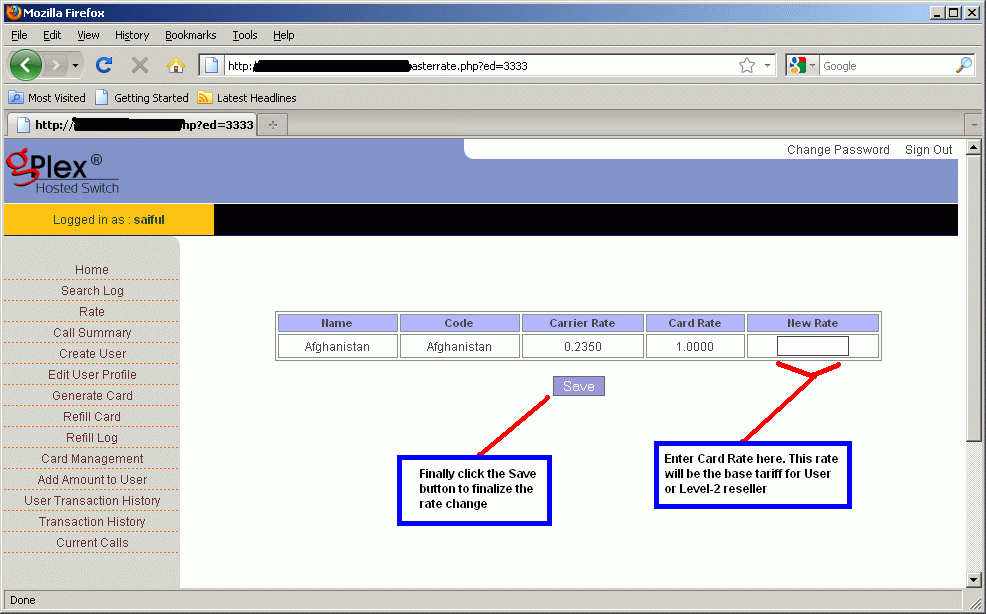
  • After clicking on the Edit link for any destination, the following screen will appear (click to enlarge).
  • In the field New Rate enter new rate for the destination which will be Level-2 / User's base tariff.
  • Finally click on the Save button, changed rate would be saved.


Show Dialing Plan:
  • After clicking on the Show link for any destination you will see a new window like the following picture.
  • Dial Digit means dialing plan (code) for the destination.


Add new rate plan:
  • Click on the Edit User Profile from the left side menu you will see all details of the clicked user. At the bottom of the page beside Rate Plan there's a button "ADD". Click on this to add additional rate plan.
  • Remember the user's default rate plan. Now select other rate plan (See the picture below) except the default.
  • In the Dial in Prefix field enter some prefix. For example, if the default rate plan for Bangladesh is 88 for Rate plan A. Than to add rate plan B as additional plan enter 00 on the Dial in Prefix field and client will dialer 88..... and 0088...... (this way). When they dial with 88 the call will go through Rate plan A and for 0088 the call will go through Rate plan B.
  • After adding new rate plan click on the Add button at the bottom of the page.


For other further details fill free to contact us or if you have any comments just type your comments below, it will be highly appreciated.
Diroo

Other related posts:

Monday, April 18, 2011

Level-2 Reseller or User Management in gPlex

Creating Level-2 reseller or User account in gPlex Switch is easy. Level-2 reseller can be created from Level-3 reseller. Take a look at the following steps:

Creating New User:
  • From your Level-3 homepage click on the Create User link at the left side.
  • Enter all details information in the required fields.
  • On the User field type reseller user name / login.
  • Password and retype Password and Name on the next three fields.
  • Select Account Type - Prepaid or Postpaid.
  • Enable Create Sub User means that you are permission to Level-2 reseller to create Level-1 reseller or Sub user. If you disable it than the user won't be able to create any Level- reseller.
  • Enable Generate card option to give permission to the User to generate new card / PIN.
  • Zero Bill CDR - Keep it Y.
  • Free Seconds - Apply for only when call get connected.
  • Set Pulses (F. ulse, N. Pulse) for the reseller.
  • Provide your user Secret. This secret will be the user's own secret. Provide this secret code to your user that he can create sub user or generate PIN.
  • Finally click on the Create User button to finalize the creation.
(Click on the following screen shot o enlarge)


Edit User Account:
  • Click on Edit User Profile. The following screen will appear.
  • Here you will see the list of all users.
  • Click on the User Name you want to edit.
Here you will see all remaining balance of all user account. Password and Secret for every reseller account can be change from here.


After Clicking on the User Name you will be taken to the following screen.
User Name can't be edited. Except it other information's can be changed. Change whatever you want to. Rate plan can also be change or extra rate plan for same user can be added. Click on the Add button beside Rate Plan. After successful change just click on the Save button at the bottom of the page. All changes will be saved.


Add Balance to User:
Click on Add Amount To User.
  • The following page will shown. At the top f the page select user first which you want to recharge.
  • Enter amount you want to recharge in the Amount field.
  • Enter some Description / Memo / Note in the Narration field.
  • Select Refill type from the below.
  • Finally press the Submit button to add Payment to user.


Transaction History of User:
Click on the User Transaction History.
Select User, Enter Start date, End Date and click FIND button.
All detail transaction history of the selected user fro the date you entered will be shown.


This are the most common basics thing need to create and maintain Level-2 reseller or User account in gPlex Switch reseller sytem.
You can read more basic VoIP Tutorial about VSR System, gPlex Switch etc from the right side of the BLOG. These will help new user's a lot.

More post about gPlex VoIP Tutorial:

Tuesday, April 12, 2011

gPlex Switch Reseller Card Management

Generating, Management, Editing... of card / PIN in gPlex switch's is little bit different than VSR System (VoIP Switch Reseller System). In VSR System PIN number can be generated only in Level-1 but in gPlex Switch Reseller, PIN can generated in Level-1, Level-2 and eve in Level-3 or Master reseller.
The process in gPlex is not so hard, According to my opinion its little bit easy then VSR System. But there's some limitations. In VSR System PIN (both user name and password) can be edited but gPlex PIN can't be edited after generating.

Lets take a look at the whole process. You can see at the right side navigation menu of this blog (VoIP Tutorial section) to see more details about VSR System.

Generate Card in Level-3 reseller:
From your Level-3 / Master reseller Homepage go to the Generate Card section at the left side. The following page will appear (Click to enlarge).
  • Select your User (Level 2) for whom you want to generate card.
  • In the Value of Card field enter the amount of card. Suppose 5 $, 10 $, 50 $ or 100$ etc..
  • Enter the Total number of cards you want to generate.
  • Enter your secret in the Secret field. You will get your reseller account's secret from your provider. Always use the secret of your logged in reseller. If you are generating cards from Level-3 than enter only your level-3 secret.
  • Click the Generate button. Within seconds your desired PINs would be generated. You will see your generated PINs. Remember one thing, your PIN could have only PIN number or even PIN number + Password. If there's only PIN number than use the PIN number as password also. Ask your provider for more details.


Card Management:
Click on the Card Management section of your reseller, you the a page like the following screen shot.
You will see several lot of PINs date wise. The date is when the PINs were generated. User is during generation which reseller you selected. Than you will see No of cards, Total remaining value of cards, Used amount etc.
Click on the date or reseller name to see more details about that Lot.


After clicking on the Date or User name you will see the following screen. Every PIN of that Lot, their Serial number, Balance, Card number, Password, Used amount, remaining amount, Active / Inactive status etc.


How to Recharge or Refill card:
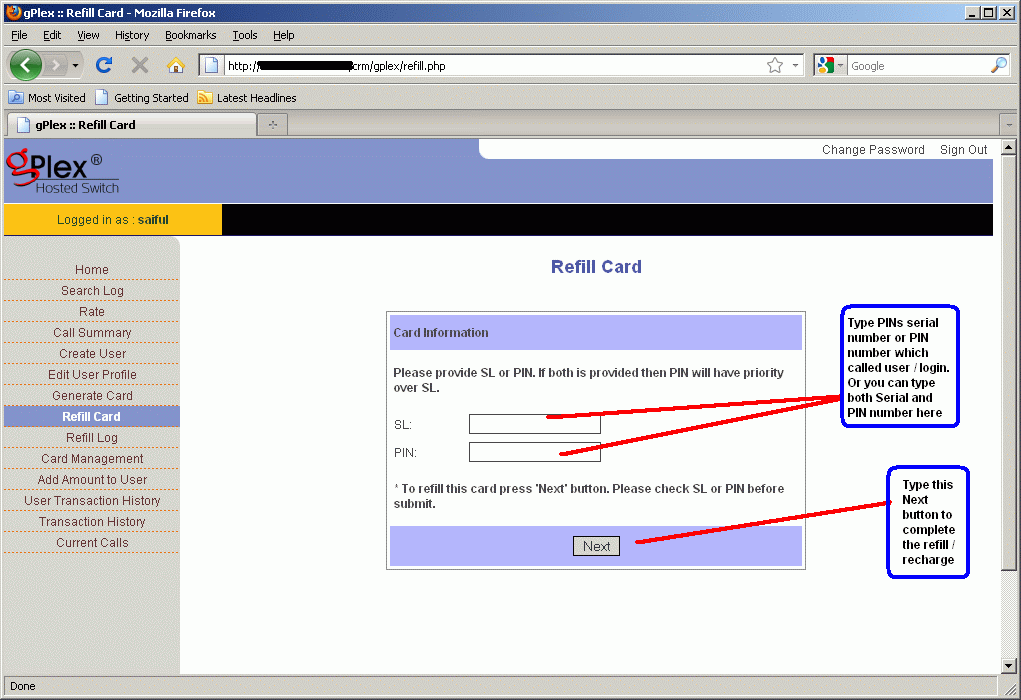
Click on the Refill card section to recharge a PIN or card. The following screen will shown.
Enter the Serial number in the SL field or enter the PIN number in the PIN field. Or even you can enter both of them.
Now press the Next button.


After pressing the Next button you will see the following screen. Here you will see all details about the PIN / Card you want to refill.
Enter the amount you want to recharge in the Refill Amount field.
Enter some narration / notes / memo en the Narration field.
Press the Refill button to finalize the refill. You will a confirmation message on the screen.


Card Refill History:
Click on the Refill Log section at the left side. Enter your PIN number for which you want to see refill history. Enter Start date and End date. and press the search button. You will see details record of the card recharge in row and column.


You can apply the above process for gPlex Level-2 and Level-1 reseller account. I think the process is little bit easier than VSR System. What do you think ? You can submit your comments below. And if you have any kind of questions regarding this matter. feel free to mail me.


Other posts related to that topic
:

Share/Bookmark