Showing posts with label Call Termination. Show all posts

Friday, September 30, 2011

Wholesale VoIP Solution

The birth of Voice-over-IP technology in late 1990s and its rapid growth in early 2000s, have resulted in the proliferation of many alternative telecom providers. Those providers have introduced a number of innovative communications services such as calling cards and callback which relied on call origination and termination over the Internet.

The growing number of new telecom providers led to increased demand for traffic aggregation services and as a result the Wholesale VoIP business was born. Wholesale VoIP providers act as traffic aggregates and/or traffic exchanges for their customers.

They sign up contracts with both retail and wholesale VoIP providers and act as a middle man for call origination and termination services. When partners send traffic to the Wholesale VoIP provider, he/she reroutes it to other partners for termination and makes profit from the difference in negotiated rates.


Business Solution
 
PROVIDER Softswitch will offer end-to-end, cost-effective and scalable Wholesale VoIP solution. That solution will feature powerful billing, flexible routing, and proven interoperability with equipment from other leading VoIP vendors.

Because all solution components will be developed by PROVIDER and Softswitch manufacturer we can eliminate integration issues and for that we can quickly start and/or expand our Wholesale VoIP business while enjoying high return on investment.


How will the solution work?

PROVIDER Experience
  • PROVIDER will receive VOIP Traffic request from Partner 1 for termination.
  • Then PROVIDER Softswitch will accept the traffic and will send authorization request to PROVIDER VoIP Billing server. The VoIP billing server will verify the account balance of Partner 1 and will authorize call termination.
  • PROVIDER Softswitch will re-route the traffic to Partner 2, hiding traffic source information.
  • Upon completing the call, the PROVIDER VoIP Billing server records will debit the account of Partner 1 and will record CDR record of the call.


Solution components are required
 
Core elements of PROVIDER Wholesale VoIP Solution include:
  • PROVIDER VOIP Billing Server is a robust billing server that provides our customers with all necessary tools to successfully implement a wide spectrum of VoIP business models.
  • PROVIDER Softswitch is an advanced VoIP softswitch that provides our customer with secure and reliable peering between their own networks and the VoIP networks of their business partners.
Other Posts:
CallShop Solution

Sunday, September 25, 2011

Callshop Solution

The rapid development of Voice-over-IP technology in the early 2000s has lead to fast innovation in the telecom sector. New telecom providers have introduced many innovative services utilizing VoIP technology, such as calling cards, call shops, broadband VoIP and others. Because such services are delivered over broadband lines, countries with well established last mile Internet infrastructure tend to adopt faster VoIP services where end-users install VoIP equipment at their premises (e.g. IP Phones), such as broadband VoIP. 

Alternatively, countries with limited or expensive last mile Internet infrastructure tend to adopt VoIP services that do not require end-users to install equipment, such as calling cards and call shops.

The Callshop business model appeals to providers in countries with limited bandwidth or expensive access to the Internet. Call shop services also offer lucrative opportunity in countries with limited number of telecom providers and heavy telecom regulation.

Consumers, in such countries, typically do not have access to low cost long distance and international telephony services. Finally, Callshops tend to flourish in areas which attract international tourism. In any of the above cases, Call shop operators can capitalize on VoIP technology and offer competitively priced calling services to any part of the world.


Business Solution
PROVIDER will offer end-to-end, cost-effective and scalable Callshop solution. The solution will feature powerful billing, flexible routing, and proven interoperability with VoIP equipment from other leading voip provider. Because PROVIDER will develop all solution components, callshop owners benefit from reduced integration costs and improved return on investment.


How will the solution work?

User experience
  • When a customer visit the Callshop. Customer will chooses a vacant telephony booth, will enters and place a call by dialing a destination number.
  • The call will get connected.
  • Upon call completion, the callshop operator will present the customer with an invoice for accumulated call charges.
  • Then the customer will pay the callshop operator.


Provider experience
  • When the user picks up the phone and dials a destination number, VoIP Gateway will send an authorization request to PROVIDER VoIP Billing Server.
  • Billing Server will verify whether a call can be placed from that particular booth and will authorize the call.
  • Then VOIP Gateway will pass the destination number to PROVIDER Softswitch and will requests routing information.
  • PROVIDER Softswitch will return VOIP Gateway the IP address of the remote (termination) gateway and VOIP Gateway will connect to it. Then the remote gateway will terminate the call to the destination party.
  • Upon call completion, PROVIDER VOIP Billing Server will records complete CDR information for the call and will make it available to the operator for billing, reporting and monitoring purposes.


Solution components are required
 
Core elements of SysMaster's Callshop Solution include:
  • PROVIDER VOIP Billing Server that supports a wide spectrum of prepaid post-paid VoIP services.
  • VOIP Gateway will be a carrier grade gateway that provides universal IP-PSTN switching, high flexibility and remote feature upgrade ability.
  • PROVIDER Softswitch is a flexible VoIP Softswitch that offers routing and reliable peering between VoIP networks and capable for high volume callshop implementations.

Other Posts:

Wednesday, September 14, 2011

Calling Card Business - Using VoIP Technology

Traditionally, the telecom sector has been one of the most lucrative market segments in both emerging and developed economies. But also traditionally, that sector has been protected by heavy local regulation. Nowadays, however, many countries have either started or are considering deregulation of their telecom sectors. Such strong trend towards liberalization of the sector, coupled with the emergence of new technologies for cost effective transport of voice data, and namely Voice-over-IP, opens up new revenue generating opportunities for entrepreneurs all over the world.


The calling cards business model offers a relatively low cost entry into the lucrative telecom market segment. The essence of the calling cards business model is to creatively segment customers by various demographic and/or behavioral characteristics and to design calling cards offerings to meet their specific calling needs. The calling cards business typically attracts entrepreneurs who want to enter the VoIP market, businesses with established retail distribution channels, and service providers who want to diversify their revenue streams.

 
Business Solution
Aiming PROVIDER as a leading VoIP service provider, PROVIDER has to offer integrated, scalable, and cost-effective calling cards solutions. Such solutions will feature powerful billing capabilities, intuitive CRM (Customer Relation Management) web portals, and proven interoperability with equipment from other VoIP providers. Because all solution components are developed by the engineers of PROVIDER and Softswitch Billing company, that reduces the need for integration costs at the PROVIDER VOIP service level which saves money for PROVIDER and improves our return on investment.


How will the solution work?
User experience
  • The user will purchase a calling card from a retail or online store.
  • The user will dial the local or toll-free access number printed on the card.
  • The user will hear a voice prompt, asking him to enter his PIN number.
  • The user will then enter the PIN number printed on the calling card using the phone dial pad.
  • He will hear his account balance and is invited to make a call.
  • The user will dial the number and will get connected.

 
Provider experience
  • When the user calls, PROVIDER Gateway, which is connected to the access number, will answer the call and send IVR prompts to the caller, inviting him to enter his PIN number.
  • PROVIDER Gateway will read the PIN and will send an authorization request to PROVIDER VoIP Billing
  • PROVIDER VoIP Billing will verify account information and will authorize the call if the user has sufficient balance.
  • Then PROVIDER Gateway will announce to the caller his account balance and will invite him to dial a destination number.
  • Then PROVIDER Gateway will pass the destination number to PROVIDER Softswitch and will request routing information.
  • PROVIDER Softswitch will return to PROVIDER Getaway the IP address of the remote gateway and Getaway will connect the call.
  • During the conversation, Getaway will convert voice signal to data packets and will route them to the terminating gateway (owned by the call termination provider) and vice versa.
  • Upon call completion, PROVIDER VoIP Billing will record complete CDR information for the call and then debit the user account with accumulated service charges.


Solution components are required
 
Core elements of PROVIDER's Calling Cards Solution include:
  • PROVIDER VoIP Billing, will be a robust billing server that provides us with all necessary tools to successfully implement a wide spectrum of VoIP business models.
  • VoIP Gateway, will be a flexible switching device that provides us with universal IP-PSTN switching, high flexibility and remote feature upgrade ability.
  • PROVIDER Softswitch will be an advanced VoIP softswitch that provides secure and reliable peering between our own networks and the VoIP networks of our business partners.

Related Topic:

Tuesday, August 16, 2011

PSTN vs VoIP


VoIP (Voice over Internet Protocol) is going to be more popular around the world comparatively with PSTN (Public Switched Telephone Network). The main reason for growing market for VoIP over PSTN is availability, reliability and low cost etc. In this article I will show that there is no reason to limit the expectations to achieve only the same level of quality as in PSTN.

By deploying wideband codec, much better voice quality can be achieved. But using narrowband codec there are some standard solution that can be used in VoIP to get finest quality voice. Such as, traditional PSTN solution does not use the available spectral bandwidth, but these can be done easily in VoIP system. Implementing a wideband codec or expanding the bandwidth of narrowband codec does not automatically guarantee great quality. There are many potential pitfalls when deploying VoIP. There are some issues need to be discussed that effect the final voice quality over PSTN or VoIP. In this article I will discuss what level of quality can be achieved and describe how this can be implemented.


Speech Signals and Speech Coding Sampled digital signals can hold frequency content up to half the sampling frequency. As we know, a young adult has a hearing span from about 20 Hz to 20,000 Hz.
And the sampling frequency of CD audio is chosen to be 44.1 kHz, which is more than double that of the highest frequency perceivable by most humans. Legacy telephony solutions are narrowband, which seriously limits the achievable quality. Wideband codec could potentially be used in digital telephone systems, but this has never been practical enough to gain any real interest

In traditional telephony applications such as PSTN, the speech bandwidth is restricted much more than the inherent limitations of narrowband coding. Typical telephony speech is band limited to 300 Hz to 3400 Hz (listen to Sound Pure digital connections are found in enterprise environments.
Due to poor connections or old wires, significant distortion is often generated in the analog part of the phone connection, a type of distortion that is entirely absent from VoIP implementations. The cordless phones so popular today also generate significant amounts of analog distortion due to radio interference and other implementation issues.


Calls between two parties in a PSTN (Public Switched Telephone Network) are connect by a series of private or public switches. The resulting fixed communications link is dedicated for the duration of the call. When an individual makes a phone call over a circuit-switched network, a connection is made between the providers PBX and the local telephone company, also known as the PSTN. Depending on the destination, this connection might extend to the national or international exchange before reaching another local exchange, where it will be passed on to the PBX and the person who receives the call. This end-to-end link, established by a series of public and private switches, is 100% dedicated on a single, per-call basis and cannot be shared or used for another function as long as the call is in progress. For this reason, these dedicated circuits cannot be shared and the carrier bills the call on a time and distance rate.

But the Internet does not use switches to link calling parties. Instead, the analog voice signal is digitized by an Internet Protocol (IP) and broken up into thousands of small data packets by a router – the VoIP equivalent to a switch. These data packets are sent, or routed, over the public Internet to their destination, enabling calls to bypass the PSTN entirely.


Other article can be read:

Thursday, August 11, 2011

What is H.323 Signaling Protocol - A basic


To provide some special services through the internet (IP based network) such as real-time audio / video communication, data communication H.323 is a standard signaling protocol which components, protocols and procedures. H.323 is part of a family of ITU-T recommendations called H.32x that provides multimedia communication services over a variety of networks.

H.323 was invented to provide various multimedia applications through LAN (Local Area Network). But due to its popularity and rapidly growing services it has evolved in needs of VoIP (Voice over Internet Protocol). One important strength of H.323 was the relatively early availability of a set of standards. It was not only used to define basic call models but in addition to supplementary services that can easily involved in Business Communications. The first VoIP standard protocol is H.323 to adopt IETF standard RTP to transport audio and video communications over the internet (IP network). H.323 standard specifies four kinds of components, when networked together, provide the "point-to-point" and "point-to-multipoint" multimedia-communication services. These are:
  • Terminals
  • Gateway
  • Gatekeepers
  • Multipoint Control Unit

Terminals: Used for real-time bi-directional multimedia communications, an H.323 terminal can either be a personal computer (PC) or a stand-alone device, running an H.323 and the multimedia applications. It supports audio communications and can optionally support video or data communications. Because the basic service provided by an H.323 terminal is audio communications, an H.323 terminal plays a key role in IP–telephony services. The primary goal of H.323 is to inter-work with other multimedia terminals. H.323 terminals are compatible with H.324 terminals on SCN and wireless networks, H.310 terminals on B– ISDN, H.320 terminals on ISDN, H.321 terminals on B–ISDN, and H.322 terminals on guaranteed QoS LANs. H.323 terminals may be used in multipoint conferences.

Gateways: A gateway connects two dissimilar networks. An H.323 gateway provides connectivity between an H.323 network and a non – H.323 network. For example, a gateway can connect and provide communication between an H.323 terminal and SCN networks ( SCN networks include all switched telephony networks, e.g., public switched telephone network [PSTN] ). This connectivity of dissimilar networks is achieved by translating protocols for call setup and release, converting media formats between different networks, and transferring information between the networks connected by the gateway. A gateway is not required, however, for communication between two terminals on an H.323 network.

Gatekeepers: A gatekeeper can be considered the brain of the H.323 network. It is the focal point for all calls within the H.323 network. Although they are not required, gatekeepers provide important services such as addressing, authorization and authentication of terminals and gateways; bandwidth management; accounting; billing; and charging. Gatekeepers may also provide call-routing services.

Multipoint Control Units: MCUs provide support for conferences of three or more H.323 terminals. All terminals participating in the conference establish a connection with the MCU. The MCU manages conference resources, negotiates between terminals for the purpose of determining the audio or video coder/decoder (CODEC) to use, and may handle the media stream. The gatekeepers, gateways, and MCUs are logically separate components of the H.323 standard but can be implemented as a single physical device.


Key Benefits of H.323:

Codec Standards: 
H.323 establishes standards for compression and decompression of audio and video data streams, ensuring that equipment from different vendors will have some area of common support.

Interoperability:
Users want to conference without worrying about compatibility at the receiving point. Besides ensuring that the receiver can decompress the information, H.323 establishes methods for receiving clients to communicate capabilities to the sender. The standard also establishes common call setup and control protocols.

Network Independence:
H.323 is designed to run on top of common network architectures. As network technology evolves, and as bandwidth management techniques improve, H.323-based solutions will be able to take advantage of those enhanced capabilities.

Platform and Application Independence:
H.323 is not tied to any hardware or operating system. H.323-compliant platforms will be available in many sizes and shapes, including video-enabled personal computers, dedicated platforms, IP-enabled telephone handsets, cable TV set-top boxes and turnkey boxes.

Bandwidth Management:
Video and audio traffic is bandwidth-intensive and could clog the corporate network. H.323 addresses this issue by providing bandwidth management. Network managers can limit the number of simultaneous H.323 connections within their network or the amount of bandwidth available to H.323 applications. These limits ensure that critical traffic will not be disrupted.

Flexibility:
An H.323 conference can include endpoints with different capabilities. For example, a terminal with audio-only capabilities can participate in a conference with terminals that have video and/or data capabilities. Furthermore, an H.323 multimedia terminal can share the data portion of a video conference with a T.120 data-only terminal, while sharing voice, video, and data with other H.323 terminals.

Inter-Network Conferencing:
Many users want to conference from a LAN to a remote site. For example, H.323 establishes a means of linking LAN-based desktop systems with ISDN-based group systems. H.323 uses common codec technology from different videoconferencing standards to minimize transcoding delays and to provide optimum performance.

Related Other Topics:

Monday, July 4, 2011

JAJAH Mobile Web - Direct Call from Mobile Web Browser


Make calls directly from your web-enabled mobile handset and save money when talking. Using the browser of your web-enabled Smart phone (Blackberry, Treo, iPAD, Smart phones by Motorola, Nokia, SonyEricsson, Samsung etc..) you can make one-click free global call around the world. No download is required to use JAJAH Mobile Web. User can make calls directly by log in with their username and password.

Requirements:


  • Run on special phone which runs on Microsoft Windows Mobile, Microsoft Windows CE, Pocket PC, Symbian Operating System.
  • JAJAH Mobile Web service is compatible with any standard mobile handset with internet connection that has WAP 2.0 or XHTML web browser.
  • It works any mobile network in any countries that has GSM and CDMA network which includes 99% of all with a minimum of 2.0 G dada service.
  • For GSM Network GPRS or EDGE is required and for CDMA network 1X(RTT) and EVDO is required.
  • For both type of networks use the term 3G and HSPDA to talk about high speed mobile data networks. All of this network type allows the end-user to use JAJAH mobile web.

Features:
  • User can make free calls to other JAJAH users and to make calls all over the world (any Landline or Mobile number) the JAJAH users can make calls with a competitive and low price. JAJAH mobile web is different if compare with other VoIP service provider because some of its special features. User can directly make calls all over the world simply using their mobile web browser. For details rate plan Click here.

  • In fall 2006 JAJAH launched a special JAJAH Mobile plug-in, a downloadable application for mobile phones, it attracted thousands of customers across the globe. Using these service users was able to make calls by sending a SMS. But today the new JAJAH Mobile Web is specially designed fro Smart Phones give opportunity to its users to make low-cost phone calls simply from their mobile web browser.

  • JAJAH Mobile web service can be use when you are in roaming. Roaming is very high-cost service any provider. But JAJAH gives you the opportunity to save this cost. TO do so you need to change your registered mobile number. During travel you can buy a local SIM card to use in your handset. Now using JAJAH mobile web you can update your registered mobile number by simply pressing the “Change” link at the top of the page. Now in the new page change your registered mobile number entering in the text box. Alternatively, you can choose one of your home, office or mobile numbers as your source number. Finally press the "Save" button and you'll return to the previous page with your updated source number. This system helps you to save your roaming fees while you are in travel.


How to make calls using JAJAH Mobile Web:
  • Open your mobile web browser.
  • Log into your JAJAH account using your username and password if you are already JAJAH user. If you are a new user than you need to get registered with JAJAH service, sign up is absolutely free.
  • For faster access next time you can bookmark this page.
  • Type the number you want to make call or you can select your saved number from your address book. To make calls check your current balance at the top of the page.
  • Now press the “Call” button and start talking.
JAJAH.Mobile Web connects you.


Related Posts to that Topic:

Saturday, April 30, 2011

Overall Monitoring of gPlex Reseller

Some basics and common tips and techniques to monitor gPlex Level-3 / Master reseller or even level-2 or level-1 reseller:

Current Calls:
  • Click on the Current Calls at the bottom of the left side menu to see active or running calls in your reseller.
  • How many calls are currently being connected will be shown (see picture).
  • Click Show details to see more details of every call.


  • After Clicked on Show Details the following screen will appear.
  • Here you will see every active call of your reseller with detail. Record for every call (User, PIN number, Destination number, Call duration etc) will be shown.


Call Summery:
  • Click on Call Summery, total call duration for every destination will shown (see the picture below).
  • Last Day: See previous or last day's call summery.
  • This Week: Call summery of running week (previous 7 days).
  • Customized report: Enter start date and end date to see specific day / days report of Call Summery.


Search Log:
  • Below Home click on the Search Log to see details call log (see the below screen shot).
  • Suppose, you want to see one of previous day's or current days or more than one days details call record for any user's or any PIN number's.
  • Select the reseller from the top or type the PIN number in the provided field.Now enter the beginning date and end date and press Submit button. To see on day's record, type start and end date same. All records of the day / days will shown for the selected user, PIN number, destination, destination number etc.


Reseller Transaction History:
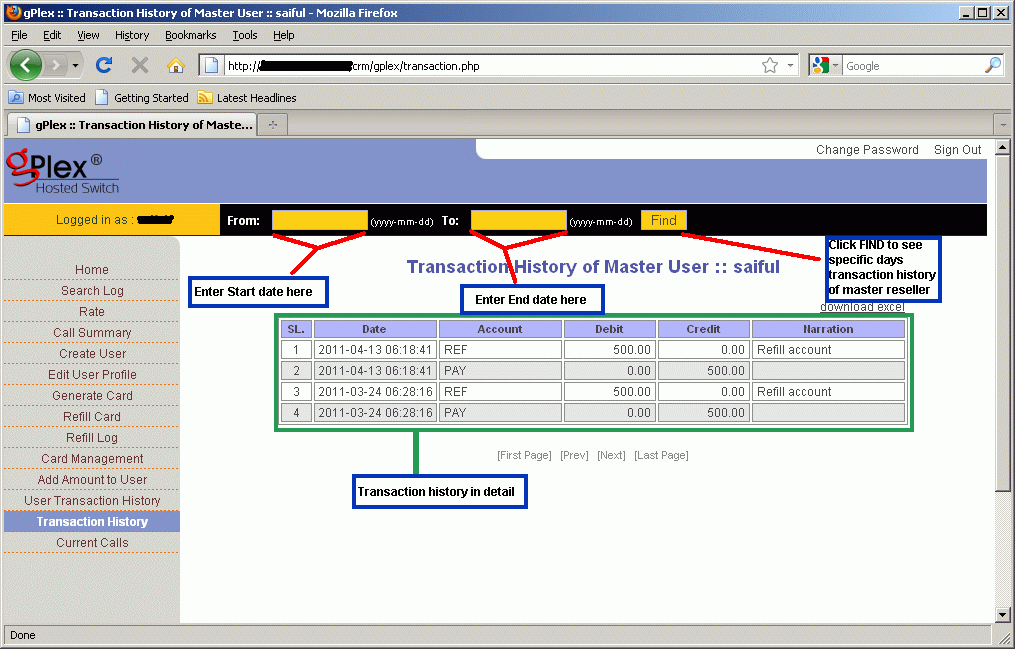
  • Click on the Transaction History. Enter start date and end date in the provided field and press Find. All transaction details of your own reseller will appear. This history can't be edited of changed. In the remarks you will see whatever your provider writes.
  • Date, time, amount, remarks / memo for every payment will be show.

The maintaining process is very easy in gPlex hosted switch. These are most common tips to regular monitoring your own Level-3 / Master reseller. Read other related posts (VoIP Tutorial) in the blog including VSR tutorial also.

Other related posts:
Rate Management in gPlex

Tuesday, January 25, 2011

PSTN, Voice and data


Voice and Data:
Telephony is the communication of spoken information between two or more participants or devices, by means of carried signals over wires or wireless. Ever since Alexander Graham Bell invented the telephone circuit and first envisioned the public telephone system (PSTN). In today world Consumers and businesses have relied on telephony as a clip of interaction.
The PSTN

In the year 2004, there were almost 200 million traditional, land phone lines in the United States of America. This network connects all these phones together wraps around the world. The main function of the PSTN (Public Switched Telephone Network) is to reliably facilitate telephone conversations at any time of day. The PSTN combines Digital, Analog and electro-mechanical data links that strive to make sure that every time you pick up your phone receiver, you hear a dial-tone, and every time you can make call directly to your friend and family or anyone across the globe whenever you need.
Some key features of PSTN, Voice, PBX and Data

  • The PSTN was developed as a result of premature telephony systems' efforts at building meshed and switched networks.
  • SS7 is the switch-to-switch signaling network using to connect and bill calls placed across the PSTN.
  • POTS (plain old telephone service), is the basic single-line analog voice service from a phone company.
  • Key systems and PBXs provide businesses a method of communicating to others for their business or any other purpose at a lower cost than dealing only with PSTN-provided services.
  • Lines and trunks are links between telephony devices. A line is a link from a switch to a phone. A trunk is a link from a switch to a switch.
  • Voice over IP encompasses a large family of interface technologies, protocols, and standards that enable real-time media applications using IP networks.
  • Traditional telephony isn't scalable like VoIP because it isn't software-driven like VoIP. Its ratio of calling capacity to network infrastructure is fixed, while VoIP's has lots of room for optimization.
  • VoIP is suitable for deployment in homes and businesses, and, thanks to broadband and deregulation, is earning a reputation as a more practical way of delivering telephony services.

With the help of Internet technologies and high-speed data connectivity in the enterprise, a new family of telephony technologies has begun called VoIP. Voice over Internet Protocol, or VoIP, has significant appeal for the enterprise, for service providers, and for end users, because it allows the Internet and commonplace data networks, like those at offices, factories, and campuses, to become carriers for voice calls, video conferencing, and other real-time media applications.

VoIP-savvy organizations are discovering that they can apply the paradigm of distributed, software-based networking to voice applications and enable a new generation of telecommunications features, cost-savings, and productivity enhancements.

VoIP can replace business telephone systems, or it can add value to existing traditional telephony devices. For instance, long-distance connectivity between two offices with traditional telephone systems can often be accomplished with a lower cost per call when VoIP is employed.

VoIP network protocols can serve as a platform for other communication media like text messaging and video conferencing. In fact, you've probably used a flavor of VoIP for such an application by now; they've been popular as an Internet pastime for several years. Yahoo! offers a "party line"-style service that features Voice over IP chat rooms. Apple's iChat and Microsoft's NetMeeting, Google's gtalk applications also offer text, voice, and video calling delivered through VoIP protocols.

Dozens of standards define how Voice over IP works, but little documentation exists on best practices for implementing and maintaining the technology in the enterprise. There's not much introductory instruction for VoIP, so beginners may have a hard time taking their first steps with it. There have been several high-profile implementation failures among large enterprise adopters, and this may be why IP telephony has such an intimidating reputation.

Nonetheless, if it's done right, Voice over IP can transform the cost model of telecommunications by combining the overhead of voice and data expertise and infrastructure. It can also enhance productivity for end users by introducing new features and for telecommunication administrators by centralizing management functions. Voice over IP can decrease the expense of future computer-telephony integration projects, while making it easier to link voice systems with web servers and database applications.

The book Switching to VoIP by Theodore Wallingford will give you practical guidance on switching to Voice over IP from traditional telephony systems. It gives a brief introduction to traditional telecom systems, and correlates their features and fundamentals to those of IP telephony systems, while showing ways of integrating traditional telephony assets into an IP-based voice network. It will describe the standards involved, so you can make educated choices among the large selection of components and vendors. It will also help you conquer some of the most problematic issues that people face when building telephony systems with Voice over IP.

Plain Old Telephone Service
When you pick up a traditional telephone, like the one in your house, the dial-tone you hear is a signal transmitted over the simplest kind of voice circuit: an analog phone line, also called a POTS (plain old telephone service) line. The line is a simple electrical loop. On the other end of the line is the telephone company's switch, or exchange. It is this switch that gives your phone its electrical power, sends the sound signals emitted by its audio transducer, and knows how to handle the numbers you dial on its keypad.

The switch also knows how to provide POTS calling features like call-waiting, a service that allows your call in progress to be placed on hold while you answer another caller who is trying to call your linewhen you tap the receiver's hook, the switch recognizes the electromagnetic signal you created (called a flash), connects your phone line to the call that's waiting on another line on the switch, and places your first caller on hold. Later, when you send the flash signal again, the first caller is re-connected with your line and you can resume the original conversation. On the PSTN, calling features are always provided by the telephone company switchnot by the phone itself.

Despite historically increasing demand for features and gains in efficiency, POTS has been the most popular type of service provided by phone companies for the last several decades. Its core of a copper loop with an electromagnetic telephone receiver on one end and a central office switch on the other end hasn't changed much during that time. POTS' stalwart reputation and simplicity have been key reasons for its longevity.

So why not keep that copper telephone loop forever? POTS works great in low-density scenarios; that is, places with a small number of simultaneous callers, such as a one-family home. POTS can also excel where extensive calling features aren't important or where the telephone is rarely used. But when density and features become more critical, POTS isn't always the best solution.

Related Topic:

Saturday, January 15, 2011

Become a Global VoIP Provider


Now a day VoIP (Voice over Internet Protocol) is one of the fastest growing and popular global telecommunication businesses around the world. You to can be part of this uprising and profitable business, everything you need some equipments and software to get you up and generating revenue quickly.

There are two types of billing system, Postpaid and prepaid. Prepaid Billing is the most popular type for VoIP service providers. Client pays advance payments and issue your own low cost personalized cards with PIN numbers.

The software for VoIP provide you with most everything you need including
Billing Software, VoIP gateways, and GSM cellular gateways, Softswitch etc.


Start your own Business:

 
Determine where you want to originate and terminate your VOIP traffic:
• For origination areas, try to choose some place that you know or reside in
 
• For termination areas, this may be less important since you will most likely utilize another service provider’s network
 
• Try to pick areas with known expensive long distance rates or telephone company controlled areas

 
Determine the amount of calls you will be making daily 
• Since you are most likely just starting out, your should start as small as possible to minimize up front expenses and learn the system.
 
• You can start with a small system of just (4) analog voice lines or a single
E1/ T1/ PRI digital line on your VoIP gateway.
 
• Pulse has Tenor systems capable of scaling to (32) E1/T1/PRI digital lines in a single chassis or GSM cellular access
 
• A good rule of thumb is (1) voice line for every (5) customers


Order your Internet connection 
• The size of your Internet connection is based the maximum number of calls you will be making at one time.
 
• Each call takes about 13-16kbps of bandwidth. If you will be making (8) simultaneous calls, you will need at least a 128kbps DSL or Cable modem connection. You may also get a T1 or E1 internet connection, but they are typically much more costly.
 
• Ask us about optional Packet Saver software for the Tenor VoIP gateways, we may be able to cut your Internet bandwidth needs in half.
 
• When ordering your internet connection you will need to order a STATIC IP address or a PUBLIC IP address.
 
• When ordering your internet connection make sure you get the required bandwidth in both directions. Some connections are slower in one direction.


What is Next ?What are you waiting for, call your Pulse representative now and get started in this fast paced, highly profitable business ! Pulsewan can help ypu to start your own VoIP Business. For more details visit : pulsewan.com


Sunday, January 2, 2011

A brief discussion about VoIP basics

Voice over Internet Protocol (VoIP) is a technology for communicating using IP (Internet protocol) instead of traditional analog telephone systems. Some VoIP services need only a regular phone connection, while others allow you to make telephone calls using an Internet connection instead. Some VoIP services may allow you only to call other people using the same service, but others may allow you to call any telephone number - including local, PSTN, long distance, wireless, and international numbers.


How VoIP Works:
VoIP converts the voice signal from your telephone into a digital signal that can travel over the Internet. If you are calling a regular telephone number, the signal is then converted back at the other end. Depending on the type of VoIP service, you can make a VoIP call from a computer, a special VoIP phone or IP Phone, or a traditional phone with or without an adapter.
 
In addition, new wireless "hot spots" in public locations such as airports, parks, and cafes allow you to connect to the Internet, and may enable you to use VoIP service wirelessly. If your VoIP service provider assigns you a regular telephone number, then you can receive calls from regular telephones that don’t need special equipment, and most likely you’ll be able to dial just as you always have.

 
Most Common Equipment to run VoIP:You may need an Internet connection, and, for many types of VoIP calls, you need a broadband Internet connection. For information on broadband Internet connections, visit www.fcc.gov/cgb/broadband.html

Depending on the VoIP service you purchase, you may need a computer, a special VoIP telephone, or a regular telephone with an adapter. If you are calling a regular telephone number, the person you are calling does not need any special equipment, just a telephone.


How to use VoIP Service:

If you use a VoIP telephone or regular telephone, you place and receive calls much like you do with regular telephone service. If you use VoIP with your computer, a telephone icon usually appears on your computer screen. Clicking the icon allows you to dial numbers from a pad, or dial a call by clicking on a contact’s pre-programmed name and number. You will then hear a ring just like any other call. Computer-based VoIP services have a variety of ways for notifying you that you have an incoming call.

Some Advantages of VoIP:VoIP may offer features and services that are not available with more traditional telephone services. If you use VoIP, you can decide whether to pay the cost of keeping your regular telephone service.

You can also use your computer and VoIP service at the same time. You can also take some VoIP services with you when you travel and use them via an Internet connection.


Special Considerations for Using VoIP: If you’re considering replacing your traditional telephone service with VoIP, be aware that:
• Some VoIP service providers may have limitations to their 911 service. For more information on VoIP and 911 services, visit the FCC’s VoIP 911 Web site at
www.voip911.gov

• Some VoIP services don’t work during power outages and the service provider may not offer backup power.

• VoIP providers may or may not offer directory assistance/white page listings.
These factors may change with new developments in VoIP technology. You should always check with potential VoIP service providers to confirm any limitations to their service, including 911 service.


Difference between Making a Local Call and a Long Distance Call using VoIP:
Some VoIP providers do not charge for calls to other subscribers to the service. Some VoIP providers charge for a long distance call to a number outside your calling area, similar to existing, traditional wireline telephone service. Other VoIP providers permit you to call anywhere at a flat rate for a fixed number of minutes. Your VoIP provider may permit you to select an area code for your VoIP service that is different from the area code in which you live. Calls within your VoIP area code may not be billed as long distance calls. People calling your VoIP area code from another area code, however, may incur long distance charges.


The FCC (Federal Communications Commission) has worked to create an environment promoting competition and innovation to benefit consumers and, where necessary, has acted to ensure that VoIP providers.  

For more details http://www.fcc.gov/
Related Other Stories:

Saturday, December 18, 2010

Technology in Banglatrac, Mirtelecom, Novotel

Banglatrac, Novotel and Mirtel are the three licensed IGW (International Gateway) Provider in Bangladesh. Except those another provider is BTCL (Bangladesh Telecommunications Company Limited) which is Bangladesh Government's own organization. In this post Some basic technology using in these three IGW provider - Banglatrac, Novotel and Mirtel will discussed:

Banglatrac:


Core Equipments:
  • Installed a State-of-the-art Ericsson end-to-end solution with the following features:
  • Telephony Server (TeS) based on Ericsson AXE 810 act as the Switching Platform (Call Control Function) which is operating on EIN 3.1.
  • Interconnected Platform based on Ericsson AXD 301.
  • Media Gateway (MGW) based on AXD 301.
  • The system supports clear channel and VoIP calls and it can handle up to 20,000 concurrent calls.
  • Redback router SE400 and Juniper ISG 2000 Firewall for Network security.

Connectivity:
Using TDM interfaces (at E1 and STM-1 level connectivity) and GE interfaces at Switch side. Routing all traffic through the SEA-ME-WE4 (SMW4) submarine cable as per Company license obligation. Beside this 10% of the total capacity of calls are handle directly with Satellite link. PoPs with softswitches in London and Hong Kong and both locations are connected via STM-1 level connectivity. These two Pops are connected using cable systems across the Pacific and Atlantic Ocean which will help reduce possibility of congestion, improve efficiency and increase diversity.

For more details: http://www.banglatraccommunications.com


Novotel:


Technology:
Connected via multiple STM-1 based TDM circuits with local operators in Bangladesh to cater highest level of Voice Quality. Multiple STM-1 links for international connectivity through SEA-ME-WE-4 submarine cable which is using both TDM circuits and IP- Internet Protocol (SIP and H.323) to maintain the quality of service. (QoS).
  • 24 hours NOC support with skilled support personnel.
  • NGN Class-4 Architecture.
  • Support for H.323, SIP and TDM based interconnects with protocol and codec conversion facility.
  • Billing system from INTEC - a leader in Interconnect Billing in the world.
  • Redundant transmission link using VSAT.
  • Network security ensured against DoS attacks and network anomalies.

For further information go to their site:http://www.novotel-bd.com/


Mirtel:


Network and  Device: 
Using a unique approach of information technology Mirtel is connecting Bangladesh in the international information super highway daily. Mirtel is one of the pioneer IGW provider of Bangladesh and its main focus is always latest technology in the Telecommunication era.

  • Mirtel is using carrier class NGN (Next Generation Network) platform with all available update Protocols, Secured and Intelligent devices with redundant capacity and connectivity in the network to satisfy customers requirements and secure their investments.
  • Mirtel Core Network supports all latest protocols with all codec.
  • 5th Generation Routers to handle GSR
  • Transmission with higher cross-connects capacity and can evaluate to all IP.

For further details go to http://mirtelecom-bd.com/


Share/Bookmark